Saturday, December 08, 2012
This is why recommend Debian instead of Ubuntu
Ubuntu provides specific repositories of nonfree software, and Canonical expressly promotes and recommends nonfree software under the Ubuntu name in some of their distribution channels. Ubuntu offers the option to install only free packages, which means it also offers the option to install nonfree packages too. In addition, the version of Linux, the kernel, included in Ubuntu contains firmware blobs.
Ubuntu's trademark policy prohibits commercial redistribution of exact copies of Ubuntu, denying an important freedom.
As of October 2012, Ubuntu sends personal data about users' searches to a server belonging to Canonical, which sends back ads to buy things from Amazon. This does not, strictly speaking, affect whether Ubuntu is free software, but it is a violation of users' privacy. It also encourages buying from Amazon, a company associated with DRM as well as mistreatment of workers, authors and publishers.
This adware is one of the rare occasions in which a free software developer persists in keeping a malicious feature in its version of a program.

Sunday, November 18, 2012
My first successfull LibreOffice build 4.0
This is my first successfull LibO build from source on my Debian sid laptop (it took a while to get all set and waiting for the copile to finish)
After all finished i started it
with make dev-install
/home/mariuz/work/libo/solver/unxlngx6.pro/installation/opt/program/soffice &

After all finished i started it
with make dev-install
/home/mariuz/work/libo/solver/unxlngx6.pro/installation/opt/program/soffice &

Thursday, November 15, 2012
Firebird 2.5.2 stable for all Ubuntu releases is uploaded into ppa
I recommend Ubuntu 12.04 LTS or 14.04 LTS
http://www.firebirdnews.org/?p=7981
The other are builded OK but with some modifications to the Debian scripts
I give some examples of modifications for Lucid and Hardy in the
debian scripts area
http://jimicompot.blogspot.ro/2012/11/firebird-252-for-ubuntu-lucid-is.html
http://jimicompot.blogspot.ro/2012/11/firebird-252-on-ubuntu-hardy.html
Hardy it will be EOL soon in April so for the next Firebird release it
will be skipped
(it doesn't support the quilt 3.0 format and and is hardest to build for )
The older the Distro the harder it it is to build the software for it .
Sunday, November 11, 2012
Lazarus FreePascal IDE on Raspberry PI
I have installed the version from debian respository
The install and developing process is the same like on any Debian machine
I have started the ide over the ssh

I have the Firebird components i can start doing Database apps like on any desktop


sudo apt-get install lazarus-ide fpc
The install and developing process is the same like on any Debian machine
I have started the ide over the ssh
ssh -X pi@192.168.1.104
lazarus-ide

I have the Firebird components i can start doing Database apps like on any desktop


Using Lazarus IDE with Firebird in Ubuntu and Debian
Install the ide

SQLdb tab also contains a component TIBConnection that you can place it on the form
We will connect to /var/lib/firebird/2.5/data/employee.fdb
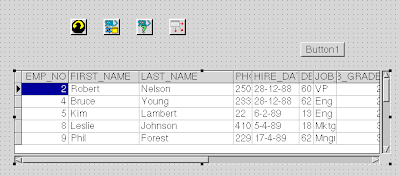
On the form put an TIBConnection, TSQLTransaction,TSQLQuery,TDatasource and an TDBGrid
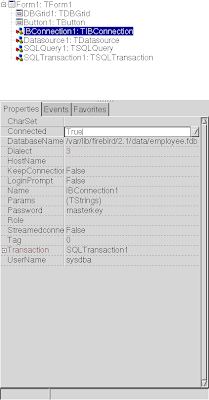
TIBConnection is configured to have DatabaseName=/var/lib/firebird/2.5/data/employee.fdb
Password=masterkey
Username=sysdba
and Transaction=SQLTransaction1
You can put it to be Connected = True
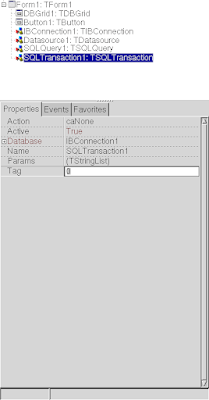
Then configure SQLTransaction1
to use
Database=IBConnection1
Active =True;
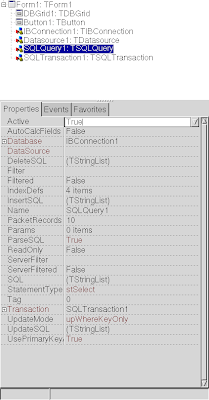
Configure TSQLQuery this way
Database:IBConnection1
SQL=select * from employee;
Active = True;
Configure TDatasource
DataSet=SQLQuery1
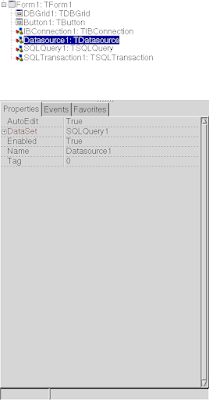
Configure TDBGrid
DataSource = DataSource1
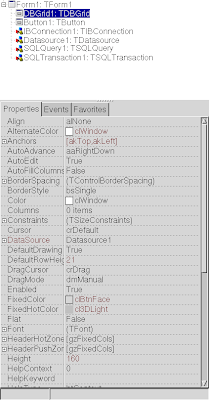
Next you can put an button and make them active from run time
procedure TForm1.Button1Click(Sender: TObject);
begin
SQLQuery1.Active:=true;
end;
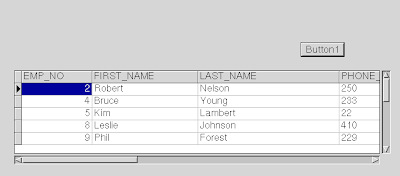
sudo apt-get install lazarus-ideStart the ide from the console/terminal
lazarus-ide &If everything went well you'll see a new tab called SQLdb. This tab will contain two components a TSQLConnection and a TSQLQuery.

SQLdb tab also contains a component TIBConnection that you can place it on the form
We will connect to /var/lib/firebird/2.5/data/employee.fdb
On the form put an TIBConnection, TSQLTransaction,TSQLQuery,TDatasource and an TDBGrid

TIBConnection is configured to have DatabaseName=/var/lib/firebird/2.5/data/employee.fdb
Password=masterkey
Username=sysdba
and Transaction=SQLTransaction1
You can put it to be Connected = True

Then configure SQLTransaction1
to use
Database=IBConnection1
Active =True;

Configure TSQLQuery this way
Database:IBConnection1
SQL=select * from employee;
Active = True;

Configure TDatasource
DataSet=SQLQuery1

Configure TDBGrid
DataSource = DataSource1

Next you can put an button and make them active from run time
procedure TForm1.Button1Click(Sender: TObject);
begin
SQLQuery1.Active:=true;
end;

Wednesday, November 07, 2012
Debian and raspberry pi = love , a small ARM Firebird super server
I have installed debian on my raspberry
here is the login and cpu info
Next i have tested the firebird python driver fdb
here is the login and cpu info
ssh pi@192.168.1.104
pi@192.168.1.104's password:
Linux raspberrypi 3.2.27+ #250 PREEMPT Thu Oct 18 19:03:02 BST 2012 armv6l

The programs included with the Debian GNU/Linux system are free software;
the exact distribution terms for each program are described in the
individual files in /usr/share/doc/*/copyright.

Debian GNU/Linux comes with ABSOLUTELY NO WARRANTY, to the extent
permitted by applicable law.

NOTICE: the software on this Raspberry Pi has not been fully configured. Please run 'sudo raspi-config'

pi@raspberrypi ~ $ cat /proc/cpuinfo
Processor : ARMv6-compatible processor rev 7 (v6l)
BogoMIPS : 697.95
Features : swp half thumb fastmult vfp edsp java tls
CPU implementer : 0x41
CPU architecture: 7
CPU variant : 0x0
CPU part : 0xb76
CPU revision : 7

Hardware : BCM2708
Revision : 000f
Serial  : 000000008c86c7c9
First thing i search in a debian is the firebird packages
 apt-cache search firebird
falconpl-dbi-firebird - Firebird SQL database abstraction layer for Falcon P.L
firebird-dev - Development files for Firebird - an RDBMS based on InterBase 6.0 code
firebird2.5-classic - Firebird Classic Server - an RDBMS based on InterBase 6.0 code
firebird2.5-classic-common - common files for firebird 2.5 "classic" and "superclassic"
firebird2.5-classic-dbg - collected debug symbols for firebird2.5-classic and -superclassic
firebird2.5-common - common files for firebird 2.5 servers and clients
firebird2.5-common-doc - copyright, licnesing and changelogs of firebird2.5
firebird2.5-doc - Documentation files for firebird database version 2.5
firebird2.5-examples - Examples for Firebird - an RDBMS based on InterBase 6.0 code
firebird2.5-server-common - common files for firebird 2.5 servers
firebird2.5-super - Firebird Super Server - an RDBMS based on InterBase 6.0 code
firebird2.5-super-dbg - collected debug symbols for firebird2.5-super
firebird2.5-superclassic - Firebird SuperClassic Server - an RDBMS based on InterBase 6.0 code
flamerobin - graphical database administration tool for Firebird DBMS
libdbd-firebird-perl - Perl DBI driver for Firebird RDBMS server
libdbi-perl - Perl Database Interface (DBI)
libfbclient2 - Firebird client library
libfbembed2.5 - Firebird embedded client/server library
libib-util - Firebird UDF support library
libwtdbofirebird-dev - Firebird backend for Wt::Dbo [development]
libwtdbofirebird32 - Firebird backend for Wt::Dbo [runtime]
php5-interbase - interbase/firebird module for php5
What is next ? installing firebird 2.5 super server of course
sudo apt-get install firebird2.5-super
Reading package lists... Done
Building dependency tree
Reading state information... Done
The following extra packages will be installed:
  firebird2.5-common firebird2.5-common-doc firebird2.5-server-common libfbclient2 libib-util
Suggested packages:
  firebird2.5-doc
The following NEW packages will be installed:
  firebird2.5-common firebird2.5-common-doc firebird2.5-server-common firebird2.5-super libfbclient2 libib-util
0 upgraded, 6 newly installed, 0 to remove and 0 not upgraded.
Need to get 3,300 kB of archives.
After this operation, 12.8 MB of additional disk space will be used.
Do you want to continue [Y/n]? Y
Get:1 http://mirrordirector.raspbian.org/raspbian/ wheezy/main firebird2.5-common-doc all 2.5.2~svn+54698.ds4-1 [636 kB]
Get:2 http://mirrordirector.raspbian.org/raspbian/ wheezy/main firebird2.5-common all 2.5.2~svn+54698.ds4-1 [95.7 kB]
Get:3 http://mirrordirector.raspbian.org/raspbian/ wheezy/main libfbclient2 armhf 2.5.2~svn+54698.ds4-1 [223 kB]
Get:4 http://mirrordirector.raspbian.org/raspbian/ wheezy/main libib-util armhf 2.5.2~svn+54698.ds4-1 [3,814 B]
Get:5 http://mirrordirector.raspbian.org/raspbian/ wheezy/main firebird2.5-server-common armhf 2.5.2~svn+54698.ds4-1 [488 kB]
Get:6 http://mirrordirector.raspbian.org/raspbian/ wheezy/main firebird2.5-super armhf 2.5.2~svn+54698.ds4-1 [1,853 kB]
Fetched 3,300 kB in 13s (238 kB/s)
Preconfiguring packages ...
Selecting previously unselected package firebird2.5-common-doc.
(Reading database ... 57783 files and directories currently installed.)
Unpacking firebird2.5-common-doc (from .../firebird2.5-common-doc_2.5.2~svn+54698.ds4-1_all.deb) ...
Selecting previously unselected package firebird2.5-common.
Unpacking firebird2.5-common (from .../firebird2.5-common_2.5.2~svn+54698.ds4-1_all.deb) ...
Selecting previously unselected package libfbclient2:armhf.
Unpacking libfbclient2:armhf (from .../libfbclient2_2.5.2~svn+54698.ds4-1_armhf.deb) ...
Selecting previously unselected package libib-util:armhf.
Unpacking libib-util:armhf (from .../libib-util_2.5.2~svn+54698.ds4-1_armhf.deb) ...
Selecting previously unselected package firebird2.5-server-common.
Unpacking firebird2.5-server-common (from .../firebird2.5-server-common_2.5.2~svn+54698.ds4-1_armhf.deb) ...
Selecting previously unselected package firebird2.5-super.
Unpacking firebird2.5-super (from .../firebird2.5-super_2.5.2~svn+54698.ds4-1_armhf.deb) ...
Processing triggers for man-db ...
Setting up firebird2.5-common-doc (2.5.2~svn+54698.ds4-1) ...
Setting up firebird2.5-common (2.5.2~svn+54698.ds4-1) ...
Setting up libfbclient2:armhf (2.5.2~svn+54698.ds4-1) ...
Setting up libib-util:armhf (2.5.2~svn+54698.ds4-1) ...
Setting up firebird2.5-server-common (2.5.2~svn+54698.ds4-1) ...
adduser: Warning: The home directory `/var/lib/firebird' does not belong to the user you are currently creating.
Setting up firebird2.5-super (2.5.2~svn+54698.ds4-1) ...
Created default security2.fdb
[ ok ] Firebird 2.5 super server not running.
[warn] Not starting Firebird 2.5 super server ... (warning).
[warn] Use `dpkg-reconfigure firebird2.5-super' to enable ... (warning).
So let's enable Firebird super server
pi@raspberrypi ~ $ sudo dpkg-reconfigure firebird2.5-super
[ ok ] Firebird 2.5 super server not running.
[ ok ] Starting Firebird 2.5 super server...done.
[ ok ] Firebird 2.5 super server already running.
Yes it's on
ps axu | grep firebird
firebird  2830  0.0  0.1   4528   796 ?        S    19:18   0:00 /usr/sbin/fbguard -daemon -forever -pidfile /var/run/firebird/2.5/fbserver.pid
firebird  2832  0.2  1.0  62444  4540 ?        Sl   19:18   0:00 /usr/sbin/fbserver
Still got 256m of free memory for nginx , php , or something better a node.js experiment Let's create/use a database and see simple firebird at work
sudo apt-get install firebird2.5-examples firebird-dev
cp /usr/share/doc/firebird2.5-common-doc/examples/empbuild/employee.fdb.gz
gunzip employee.fdb.gz
sudo chown firebird.firebird employee.fdb
mv employee.fdb /var/lib/firebird/2.5/data

isql-fb
Use CONNECT or CREATE DATABASE to specify a database
SQL> connect "/var/lib/firebird/2.5/data/employee.fdb " user 'SYSDBA' password 'masterkey'
CON> ;
Database:  "/var/lib/firebird/2.5/data/employee.fdb ", User: SYSDBA
SQL>
show tables;
       COUNTRY                                CUSTOMER
       DEPARTMENT                             EMPLOYEE
       EMPLOYEE_PROJECT                       JOB
       PROJECT                                PROJ_DEPT_BUDGET
       SALARY_HISTORY                         SALES


SQL> show version;
ISQL Version: LI-V2.5.2.26508 Firebird 2.5
Server version:
Firebird/linux ARM (access method), version "LI-V2.5.2.26508 Firebird 2.5"
Firebird/linux ARM (remote server), version "LI-V2.5.2.26508 Firebird 2.5/tcp (raspberrypi)/P12"
Firebird/linux ARM (remote interface), version "LI-V2.5.2.26508 Firebird 2.5/tcp (raspberrypi)/P12"
on disk structure version 11.2
SQL>
SQL> create database "/var/lib/firebird/2.5/data/first_database.fdb" user 'SYSDBA' password 'masterkey'
CON> ;
Commit current transaction (y/n)?y
Committing.
SQL> connect "/var/lib/firebird/2.5/data/first_database.fdb" user 'SYSDBA' password 'masterkey';
Commit current transaction (y/n)?y
Committing.
Database:  "/var/lib/firebird/2.5/data/first_database.fdb", User: SYSDBA
SQL> CREATE TABLE TEST (ID INT NOT NULL PRIMARY KEY, NAME VARCHAR(20));
SQL> show tables
CON> ;
       TEST
SQL> INSERT INTO TEST VALUES (1, 'John');
SQL> INSERT INTO TEST VALUES (2, 'Joe');
SQL> select * from test;

          ID NAME
============ ====================
           1 John
           2 Joe

SQL>
Later i will try firebird c api examples
cd /usr/share/doc/firebird2.5-common-doc/examples/api
cp *.gz ~/
chown pi.pi *.gz
cd ~
gunzip *.gz
gcc -L/usr/lib -lfbclient -I/usr/share/doc/firebird2.5-common-doc/examples/include/ api1.c
ISC_USER=SYSDBA ISC_PASSWORD=masterkey ./a.out /tmp/new.fdb
Created database '/tmp/new.fdb'.

Successfully accessed the newly created database.
So all it works as it should without errors and at the speed of pentium 2 like system or even faster I love the small server and i can leave it on 24x7 without the need to think too much for the energy costs
Next i have tested the firebird python driver fdb
sudo apt-get install python-pip


pip install fdb
cat test.py
con = fdb.connect(dsn='/var/lib/firebird/2.5/data/employee.fdb', user='sysdba', password='masterkey')

cur = con.cursor()
SELECT = "select * from employee"


# 2. Equivalently using fetchall():
# This is potentially dangerous if result set is huge, as the whole result set is first materialized
# as list and then used for iteration.
cur.execute(SELECT)
for row in cur.fetchall():
    print 'ID:%d Name %s.' % (row[0], row[1])


python test.py
....
ID:141 Name Pierre.
ID:144 Name John.
ID:145 Name Mark.
Next on my testing list is compiling the node.js (doing it rightnow) and the pure JavaScript Firebird driver with an express demo
Update : compiling node is done here are my results
Tuesday, November 06, 2012
TopDAY: Drupal Meetup in Târgu Mureș
Great PHP local event will take place in Târgu Mureș, in November 8: TopDAY - Drupal Meetup. The event is focusing on short presentations about Drupal and is supported by Reea
Details:
- Read the official post
- Register to the event
Saturday, November 03, 2012
Upgrading from ubuntu 12.10 to debian sid
A good idea is to install a light desktop manager like lxdm or xfce so at least you have a DM in case
gnome will not work out
Install debian keyring http://packages.debian.org/sid/all/debian-archive-keyring/download
modify /etc/apt/sources.list
delete all the lines and
add these ones
deb http://http.debian.net/debian/ sid main contrib non-free
deb-src http://http.debian.net/debian/ sid main contrib non-fre
apt-get update
apt-get -f -o Dpkg::Options::="--force-overwrite" upgrade
there will be a lot of issues and it might bring your machine unbootable
So be prepared with a testing debian stick or cd
Make a list with packages removed by the dist-upgrade
in my case i have noticed that network manager will be removed
apt-get -f -o Dpkg::Options::="--force-overwrite" dist-upgrade
From the removed packaged i picked the critical ones that i know i need and i download them before to start the upgrade so i can install them with dpkg -i
Here is my list that i needed on my system (that i know that are critical to me and to make the system functional)
apt-get install --download-only network-manager network-manager-gnome lxde modemmanager ssh openssh-server alsa-utils anacron at
Here are some of the issues that could happen while upgrading the machine there are many dpkg-new files in the /etc/init.d/ folder so here are some tips bellow
Init scripts and networking system
Get rid of upstart first. I had problems with sysv-rc and needed to force reconfiguration. Some init scripts were installed with "dpkg-new" in the name, I had to rename them. As with X, I tried few solutions, this is distilled but stil redundant version:
gnome will not work out
Install debian keyring http://packages.debian.org/sid/all/debian-archive-keyring/download
modify /etc/apt/sources.list
delete all the lines and
add these ones
deb http://http.debian.net/debian/ sid main contrib non-free
deb-src http://http.debian.net/debian/ sid main contrib non-fre
apt-get update
apt-get -f -o Dpkg::Options::="--force-overwrite" upgrade
there will be a lot of issues and it might bring your machine unbootable
So be prepared with a testing debian stick or cd
Make a list with packages removed by the dist-upgrade
in my case i have noticed that network manager will be removed
apt-get -f -o Dpkg::Options::="--force-overwrite" dist-upgrade
From the removed packaged i picked the critical ones that i know i need and i download them before to start the upgrade so i can install them with dpkg -i
Here is my list that i needed on my system (that i know that are critical to me and to make the system functional)
apt-get install --download-only network-manager network-manager-gnome lxde modemmanager ssh openssh-server alsa-utils anacron at
Here are some of the issues that could happen while upgrading the machine there are many dpkg-new files in the /etc/init.d/ folder so here are some tips bellow
Init scripts and networking system
Get rid of upstart first. I had problems with sysv-rc and needed to force reconfiguration. Some init scripts were installed with "dpkg-new" in the name, I had to rename them. As with X, I tried few solutions, this is distilled but stil redundant version:
dpkg-reconfigure sysv-rc
cd /etc/init.d
mv acpid.dpkg-new acpid
mv anacron.dpkg-new anacron
mv atd.dpkg-new atd
mv cron.dpkg-new cron
mv dbus.dpkg-new dbus
mv module-init-tools.dpkg-new module-init-tools
mv procps.dpkg-new procps
mv rsyslog.dpkg-new rsyslog
mv udev-mtab udev
apt-get --reinstall install base-files ifupdown initscripts netbase sysv-rc sysvinit sysvinit-utils
Saturday, October 13, 2012
People still use Pascal? yes and is Growing
Free Pascal and Delphi/ OO Pascal is growing that is what Tiobe says : if you add them both it should be in the top 10 programming languages displacing Ruby and JavaScript
1.097+0.839=1.936
Another more credible source is the downloads page on sourcefogre for the Lazarus IDE
We assist on Libre Pascal Renascence of Hacker culture that they don't care about corporate languages like C#/Java
Why ? because Pascal is Modern and insanly Fast and it does have it's own advatages compared with other languages.
Here are advatages in using the modern Pascal http://www.freepascal.org/advantage.var
I have written my own rants here , feel free to comment
The trend is for typed and more readable languges TypeScript , Python , Ruby ...
Wednesday, October 03, 2012
Installing Firebird Active Record driver for Ruby
Here is how to install activerecord-fb-adapter for rails
using the the gem version
Update:Rails works with this driver and here is the Rails guide
using the the gem version
gem install activerecord-fb-adapter
Fetching: fb-0.7.*.gem (100%)
Building native extensions.  This could take a while...
Fetching: activerecord-fb-adapter-0.7.*.gem (100%)
Successfully installed fb-0.7.*
Successfully installed activerecord-fb-adapter-0.7.*
2 gems installed
That is all You can build it manually if you wish
git clone https://github.com/rowland/activerecord-fb-adapter.git
cd activerecord-fb-adapter
rake gem

ls -lah pkg/activerecord-fb-*

gem install pkg/activerecord-fb-adapter-*.gem

Successfully installed activerecord-fb-adapter-0.7.*
1 gem installed
Successfully installed

gem install rails
So now we are ready to play with Rails on Fire
Update:Rails works with this driver and here is the Rails guide
Sunday, September 30, 2012
Meet Compton - compozite manager for Lubuntu with shadows, transparencies and smooth transitions Installing it on Ubuntu 12.04
In Lubuntu 12.10 You can have shadows, transparencies and smooth transitions in your windows and programs thanks to Compton, the new composite manager in town. It's a fork from xcompmgr-dana (which is a fork istelf from xcompmgr). Thanks to our pals at Crunchbang Linux, we can use the GIT versions on Lubuntu too.

Download your 32bit or 64bit version and try it while it's hot. Combine it with your favourite dock or whatever. And this program solves the problem that Lubuntu 12.10 users may have with other composite managers, like Cairo or XCompMgr. You can check the screenshot to see it's really beautiful, but I can sure you that it's really fast too!
To install it on Lubuntu 12.04 you need to get the libconfig9 from 12.10
The wallpaper is from here
http://sostopher.deviantart.com/gallery/?catpath=/&offset=24#/d1wuxjo

Download your 32bit or 64bit version and try it while it's hot. Combine it with your favourite dock or whatever. And this program solves the problem that Lubuntu 12.10 users may have with other composite managers, like Cairo or XCompMgr. You can check the screenshot to see it's really beautiful, but I can sure you that it's really fast too!
To install it on Lubuntu 12.04 you need to get the libconfig9 from 12.10
The wallpaper is from here
http://sostopher.deviantart.com/gallery/?catpath=/&offset=24#/d1wuxjo
Friday, September 28, 2012
#Perl #Firebird driver DBD-Firebird 1.11 is released with utf-8 and other bugfixes
On the behalf of the developers and contributors team, I'm pleased to announce that DBD::Firebird v1.11 , a DBI driver for the Firebird RDBMS server is released.
This release brings many changes and bugfixes .
Thank you,
This release brings many changes and bugfixes .
* Test::Exception is required
* On freebsd Threaded perl is required you have to re-install perl from ports and you have to select the config option that says 'build a perl with threads'
* Test database to use UTF8 charset and enable UTF8 for the connection
* Fix CHAR lenght when using multi-byte character set Fixes Github Issue #32 (RT#76506)
* additional debug when finishing already finished statement
* avoid double destroying of statement in auto-commit mode with DDL Fixes Github Issue #30 (RT#72946)
The development is done on GitHub And the mailing list is here
Thank you,
Wednesday, August 01, 2012
following twitter users at once from ruby
You need to create a new twitter application on dev and create a callback url for it
you can start with the code from twitter-app https://github.com/jnunemaker/twitter-app
clone it with git , and then run
bundle install to have all the requirements in your rvm
Then create a button for it or a text box where you insert one user that you want to follow
and for each follower for one user you can add it to your list of followers after you aprove the app
I have added twitter.local in hosts also in domains anyware
and the callback is
http://twitter.local:3000/sessions/callback
More documentation for follow is here
http://rubydoc.info/gems/twitter/3.4.1/Twitter/API:follow
you can start with the code from twitter-app https://github.com/jnunemaker/twitter-app
clone it with git , and then run
bundle install to have all the requirements in your rvm
Then create a button for it or a text box where you insert one user that you want to follow
and for each follower for one user you can add it to your list of followers after you aprove the app
I have added twitter.local in hosts also in domains anyware
and the callback is
http://twitter.local:3000/sessions/callback
More documentation for follow is here
http://rubydoc.info/gems/twitter/3.4.1/Twitter/API:follow
Tuesday, July 31, 2012
Converting sylpheed filters to claws
Download from the claws tools area filter_conv_new.pl
http://www.claws-mail.org/tools.php
Install libxml-simpleobject-per
sudo apt-get install libxml-simpleobject-perl
then unzip it and run it
perl filter_conv_new.pl
Converted 12 filters
Now the filters should apear in the sylpheed Filtering configuration area
Perl is great :)
http://www.claws-mail.org/tools.php
Install libxml-simpleobject-per
sudo apt-get install libxml-simpleobject-perl
then unzip it and run it
perl filter_conv_new.pl
Converted 12 filters
Now the filters should apear in the sylpheed Filtering configuration area
Perl is great :)
Thursday, July 26, 2012
Enabling spamassassin in claws email
I was using sylpheed so i have decided to enable local scanning for this i needed to upgrade the email client to claws mail (it does have the sa scanning plugin)
so first remove the sylpheed , then install claws email
sudo apt-get install claws-mail
then install the sa plugin
claws-mail-spamassassin
next step is to enable the spamd daemon
in /etc/default/spamassassin
enable
ENABLED=1
sudo /etc/init.d/spamassassin restart
Next load the plugin in the email client

and then configure it to use the local daemon

You can see it at work by marking sad figure over the emails with spam
I have created a filter to move them to Trash folder

so first remove the sylpheed , then install claws email
sudo apt-get install claws-mail
then install the sa plugin
claws-mail-spamassassin
next step is to enable the spamd daemon
in /etc/default/spamassassin
enable
ENABLED=1
sudo /etc/init.d/spamassassin restart
Next load the plugin in the email client

and then configure it to use the local daemon

You can see it at work by marking sad figure over the emails with spam
I have created a filter to move them to Trash folder

Monday, July 16, 2012
Why amazon ec2 is better than heroku : it's the price
Compared with a ronin database instance = 200$
For 57.6$ per month if we calculate month=30 days on ec2 i can get a small ubuntu linux instance with 1.7G of ram with a lot more than 10.000 rows
http://aws.amazon.com/ec2/instance-types/
After that installing a firebird database can be easy if i choose a ubuntu instance
Next you can add nginx/django just for fun
For backup there are many python scripts to backup to s3/ebs snapshots
For 57.6$ per month if we calculate month=30 days on ec2 i can get a small ubuntu linux instance with 1.7G of ram with a lot more than 10.000 rows
http://aws.amazon.com/ec2/instance-types/
After that installing a firebird database can be easy if i choose a ubuntu instance
Next you can add nginx/django just for fun
For backup there are many python scripts to backup to s3/ebs snapshots
Friday, July 13, 2012
forum.ubuntu.ro is one of the most popular support forums in Romania
- forum.ubuntu.ro is one of the most popular support forums in Romania with 23576 users and 129521 posts. (6369 users and 65895 posts in mid 2010).
- huge spikes in traffic on www.ubuntu.ro every 6 months when a new Ubuntu version is released. More than 5800 hits when 12.04 launched.

Romanian Team roadmap
- Continue improving Ubuntu translations and documentation, together with offering support via forum.ubuntu.ro
- Take part in all major Romanian FLOSS event - next one will be FLOSS Camp 2012 (http://camp.softwareliber.ro/2012/)
- Contribute with local organizations promoting free software and technologies in education.

Thursday, July 05, 2012
FLOSSCamp Romania - Jul 26 - 29 / Brasov, Romania
Help spread the word, and if you can, and you are there, is worth to participate, you will have a good time and meet great people.
Google plus events page
And the site with the info about travelling
http://camp.softwareliber.ro/2012/


Google plus events page
And the site with the info about travelling
http://camp.softwareliber.ro/2012/


Saturday, June 23, 2012
Linux-0.01 kernel building on ubuntu hardy
linux-0.01-rm-3.5 now builds ok on hardy but only on 32 bit version
The best way to try is to install hardy , or debian lenny in kvm-linux or virtualbox and then try the instructions bellow
Official 0.0.1 project news and downloads are located here
You might need some packages first
$sudo apt-get install bin86 kvm qemu gcc build-essential
$wget http://ftp.be.debian.org/pub/linux/kernel/people/abdel/linux_0.01/sources/linux-0.01-rm-3.5.tar.gz
$tar -zxvf linux-0.01-rm-3.5.tar.gz
$cd linux-0.01-rm-3.5
$make
or time make
make[1]: Leaving directory `/home/mariuz/linux-0.01-rm-3.5/lib'
ld -s -x -M -Ttext 0 -e startup_32 boot/head.o init/main.o \
kernel/kernel.o mm/mm.o fs/fs.o \
lib/lib.a \
-o tools/system > System.map
(echo -n "SYSSIZE = (";stat -c%s tools/system \
| tr '\012' ' '; echo "+ 15 ) / 16") > tmp.s
cat boot/boot.s >> tmp.s
as86 -0 -o boot/boot.o tmp.s
00286 /*
00287 * This procedure turns off the floppy drive motor, so
00288 * that we enter the kernel in a known state, and
00289 * don't have to worry about it later.
00290 */
00286 /*
00287 * This procedure turns off the floppy drive motor, so
00288 * that we enter the kernel in a known state, and
00289 * don't have to worry about it later.
00290 */
rm -f tmp.s
ld86 -0 -s -o boot/boot boot/boot.o
gcc -Wall -O -fstrength-reduce -fomit-frame-pointer -fno-stack-protector \
-o tools/build tools/build.c
#chmem +65000 tools/build
objcopy -O binary -R .note -R .comment tools/system tools/system.bin
tools/build boot/boot tools/system.bin > Image
Boot sector 452 bytes.
System 89732 bytes.
real 0m4.512s
user 0m3.696s
sys 0m0.768s
then rename Image to linux0.01-3.5.img
qemu -hdb hd_oldlinux.img -fda linux0.01-3.5.img -boot a
you must use the hd image from here if you don't have it yet
wget http://draconux.free.fr/download/os-dev/linux0.01/Image/hd_oldlinux.img.zip
unzip hd_oldlinux.img.zip

The best way to try is to install hardy , or debian lenny in kvm-linux or virtualbox and then try the instructions bellow
Official 0.0.1 project news and downloads are located here
You might need some packages first
$sudo apt-get install bin86 kvm qemu gcc build-essential
$wget http://ftp.be.debian.org/pub/linux/kernel/people/abdel/linux_0.01/sources/linux-0.01-rm-3.5.tar.gz
$tar -zxvf linux-0.01-rm-3.5.tar.gz
$cd linux-0.01-rm-3.5
$make
or time make
make[1]: Leaving directory `/home/mariuz/linux-0.01-rm-3.5/lib'
ld -s -x -M -Ttext 0 -e startup_32 boot/head.o init/main.o \
kernel/kernel.o mm/mm.o fs/fs.o \
lib/lib.a \
-o tools/system > System.map
(echo -n "SYSSIZE = (";stat -c%s tools/system \
| tr '\012' ' '; echo "+ 15 ) / 16") > tmp.s
cat boot/boot.s >> tmp.s
as86 -0 -o boot/boot.o tmp.s
00286 /*
00287 * This procedure turns off the floppy drive motor, so
00288 * that we enter the kernel in a known state, and
00289 * don't have to worry about it later.
00290 */
00286 /*
00287 * This procedure turns off the floppy drive motor, so
00288 * that we enter the kernel in a known state, and
00289 * don't have to worry about it later.
00290 */
rm -f tmp.s
ld86 -0 -s -o boot/boot boot/boot.o
gcc -Wall -O -fstrength-reduce -fomit-frame-pointer -fno-stack-protector \
-o tools/build tools/build.c
#chmem +65000 tools/build
objcopy -O binary -R .note -R .comment tools/system tools/system.bin
tools/build boot/boot tools/system.bin > Image
Boot sector 452 bytes.
System 89732 bytes.
real 0m4.512s
user 0m3.696s
sys 0m0.768s
then rename Image to linux0.01-3.5.img
qemu -hdb hd_oldlinux.img -fda linux0.01-3.5.img -boot a
you must use the hd image from here if you don't have it yet
wget http://draconux.free.fr/download/os-dev/linux0.01/Image/hd_oldlinux.img.zip
unzip hd_oldlinux.img.zip

Monday, June 18, 2012
PHP GD Bundled - Compilation Instructions for Ubuntu 12.04
I needed to recompile the gd in ubuntu 12.04 to work with gd bundled version
Warning i don't use mysql but only firebird so your requirements may vary
- Open up a terminal.
- Become root by typing su and enter your root password when prompted.
- Download some packages we'll need for the install. Type apt-get install build-essential debhelper fakeroot dpkg-dev firebird2.5-dev
- Change your current directory to your source one. cd /usr/src.
- Download the PHP 5 source code by typing apt-get source php5.
- We also need the PHP 5 dependencies. To download these, enter apt-get build-dep php5.
- Go into the downloaded PHP directory. cd php5-XXXX. just press
after you've typed php5- to complete the folder name. - Now we need to edit a config file to change it into the bundled version of GD. Type editor debian/rules. (I have removed any reference to mysql in the cofigure lines )
- Locate the line that says --with-gd=shared,/usr --enable-gd-native-ttf \ and change it to --with-gd=shared --enable-gd-native-ttf \ by removing ,/usr. (Press ctrl+w to find something, if you search for gd, it is near the second occurrence). To save the file, we need to press ctrl+x then press y and then enter.
- Now we've done setting up we now need to compile it. Type dpkg-buildpackage -rfakeroot -d
- When it's done, you should have a load of .deb files in the parent directory. Find the one starting with php5-gd.
- Install it by double clicking on it, or from the terminal, type dpkg -i php5-gdXXXXXXX just press
after you've typed php5-gd to complete the file name.
Subscribe to:
Posts (Atom)