Sunday, May 17, 2015

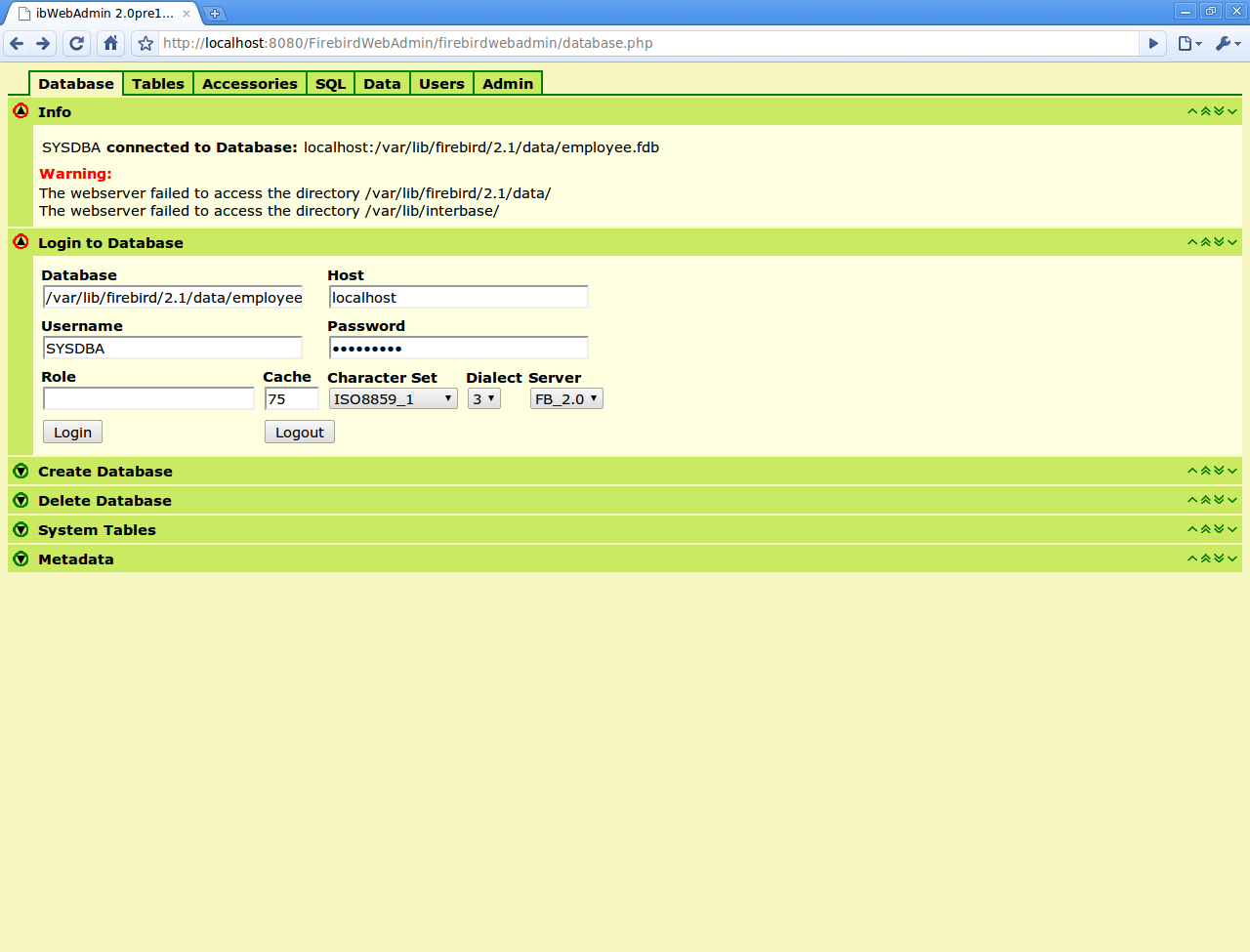
Firebird PHP Web Admin with Bootstrap 3.x

Here is one screenshot with new Firebird Web Admin interface


Compare with previous version

Saturday, May 16, 2015

Gibbous - A Cthulhu Adventure (Pre-Alpha Demo Footage)

Gibbous is a classic 2d point and click adventure, and yes it’s a Lucas Arts-like game. It also is, as the subtitle so unsubtle-y gives it away, a loving spoof of everything Lovecraftian, and then some.

Pre-Alpha demo footage


Wednesday, May 13, 2015

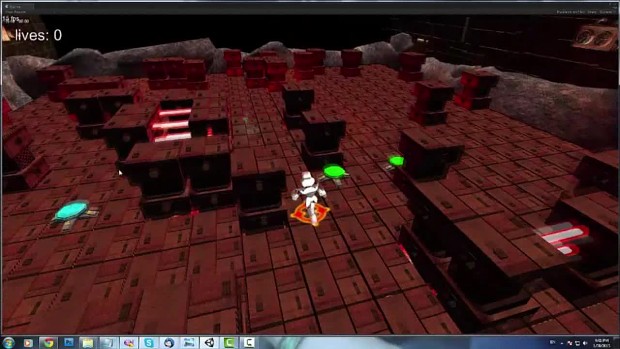
Timo-T puzzle game [WIP]


The Gameplay is relatively easy: You are a robot that has to press some buttons in a certain sequence in order to get to the next level (the buttons are just a sketch they are not final). Every level is time elapsing from 3-5 min per level. All the levels are basically on the same platform, the only difference is that the platforms are moving up and down and as U advance in the game it will be harder and harder because the higher levels will have certain paths which U must go on the and rest will be lava. There will be lasers as shown in the teaser and plasma bullets shot from the ceiling. The robot will have 2 special abilities with a cooldown meter and there will be power-ups like walk on lava for a few seconds and restore health. And of course the facility is built inside of a volcano.

Boxshot
http://www.indiedb.com/games/timo-t

Timo-T


Thursday, May 07, 2015

Installing Firebird Ruby driver on Windows 10 x64


Install firebird 2.5.4 x64 with fbclient copy to system dir (checked).
Install rubyinstaller 2.x x64
Download Devkit for ruby 2.x (x64 – 64bits only)
unzip it in C:\rubydevkit
open cmd.exe in start->run
cd rubydevkit
run ruby dk.rb init and ruby dk.rb install to bind it to ruby installations in your path.

Then gem install fb will go without issues after compilation.
After that you can install rails 4.2.x and ActiveRecord Firebird Adapter.

Tuesday, May 05, 2015

Firebird 2.5.4 Final for Ubuntu LTS releases is uploaded into Firebird stable ppa


Here you can find the latest stable release Firebird 2.5.4 for LTS supported Ubuntu releases.
Follow the Firebird 2.5.x guide for usage and installation.

ps:Also package for latest supported Ubuntu:15.04 is uploaded

Tuesday, April 28, 2015

Saturday, April 25, 2015

Ubuntu 15.04 allows systemd removal

One way to boot your ubuntu 15.04 faster is to switch to upstart and remove systemd

sudo apt-get install upstart-sysv

https://wiki.ubuntu.com/VividVervet/ReleaseNotes#Boot_and_service_management

Wednesday, February 18, 2015

CodeIgniter 3 (php framework) includes support for Firebird

The Userguide of Codeigniter 3 (still Release Candidate) mentions that now has support for Firebird:
Added Interbase / Firebird database support via the ibase driver.
This means that the installation package CI 3 includes it, although you could previously use Firebird in CodeiIgniter 2 by the driver developed by Carlos GarcĂ­a ( https://github.com/cgarciagl/Firebird-for-Codeigniter ) .

 We are very happy that CodeIgniter 3 integrates support for Firebird,  In fact CodeIgniter is a stable platform where I (albringas)'ve done developments and with very good results.


To see the rest of the new features of CodeIgniter 3 these are the addresses: http://www.codeigniter.com/userguide3/
http://www.codeigniter.com/userguide3/changelog.html

I also put the direction of an article I wrote about using Firebird with CodeIgniter 2, in my blog: http://albringas.com/noticias/detalle/3103/ 

Monday, February 16, 2015

Building Firebird 3.0 Client / Embedded for Android Arm-32 bits

Download and install ndk  unzip in your home
install firebird build dependencies
sudo apt-get build-dep firebird3.0
sudo apt-get install libtommath-dev


export NDK=$HOME/android-ndk-r10e
echo $NDK

get the Firebird 3.0 source code from https://github.com/FirebirdSQL/firebird/tree/B3_0_Release

git clone https://github.com/FirebirdSQL/firebird.git
cd core 
git checkout B3_0_Release
./autogen.sh  --with-cross-build=android.arm --without-editline --enable-binreloc
make
There was a libedit.a linking error so i had to copy it manually
cp extern/editline/src/libedit.a gen/Release/firebird/lib/libedit.a
after that the libfbclient.so is created for arm

file  gen/buildroot/opt/firebird/lib/libfbclient.so.3.0.0 
gen/buildroot/opt/firebird/lib/libfbclient.so.3.0.0: ELF 64-bit LSB  shared object, x86-64, version 1 (SYSV), dynamically linked, BuildID[sha1]=b6cb7db07fcad2475aa79352fb515cbe3ac44eea, stripped

Soon i will add a download link

ps: fbclient.so in 3.0 can be used as embedded

Monday, December 08, 2014

Firebird 3.0 Beta 1 release is available for testing


Firebird Project announces the first Beta release of Firebird 3.0, the next major version of the Firebird relational database, which is now available for testing.

This Beta release demonstrates the features and improvements currently under development by the Firebird development team. Our users are appreciated giving it a try and providing feedback to the development mailing list. Apparent bugs can be reported directly to the bugtracker.

Beta releases are not encouraged for production usage or any other goals that require a stable system. They are, however, recommended for those users who want to help in identifying issues and bottlenecks thus allowing to progress faster through the Beta/RC stages towards the final release.

Please read the Release Notes carefully before installing and testing this Beta release.

Friday, November 21, 2014

Node.JS and Firebird driver (node-firebird-libfbclient) installing on Amazon EC2 instance

Here are the notes on Installing node.js module for firebird
I assume Firebird was installed from source or from tar.gz and in a linux instance


wget https://nodejs.org/dist/v4.6.0/node-v4.6.0.tar.gz
tar -zxvf node-v4.6.0.tar.gz
cd  node-v4.6.*
./configure 
sudo make install

Next is time to install the firebird module (Firebird was installed from source in /opt/firebird2.5.x)

git clone git://github.com/xdenser/node-firebird-libfbclient.git
cd node-firebird-lib
export PATH=$PATH:/opt/firebird2.5.x/binfbclient/

npm -g install

create firebird db and test table in /tmp/nodedb.fdb with isql or isql-fb

SQL>CREATE DATABASE "localhost:/tmp/nodedb.fdb" user 'SYSDBA' password '*********';
SQL> CREATE TABLE TEST (ID INT NOT NULL PRIMARY KEY, NAME VARCHAR(20));
SQL> create generator gen_test_id;
SQL> SET GENERATOR gen_test_id TO 10;
SQL> set term !! ;
SQL> CREATE TRIGGER TEST_BI FOR TEST
CON> ACTIVE BEFORE INSERT POSITION 0
CON> AS
CON> BEGIN
CON> if (NEW.ID is NULL) then NEW.ID = GEN_ID(GEN_TEST_ID, 1);
CON> END!!
SQL> set term ; !!

Then write the test.js script to connect to it


you can observe that the id is auto incremented if you run it multiple time

node test.js 
[ { ID: 5, NAME: 'new one' },
  { ID: 11, NAME: 'new one' },
  { ID: 12, NAME: 'new one' },
  { ID: 13, NAME: 'new one' },
  { ID: 14, NAME: 'new one' } ]

also in the name you can put later the
browser or the ip in one of the columns


We build now the version for the web modifying the hello world version adding the firebird database glue


you can run it with
 node firebird_example.js

Rails On Firebird - status and follow the guide

Rails On Firebird - you need to check that Firebird active record adapter and ruby driver are installed
Install Rails 4.x :
 gem install rails
Generate a new Firebird Rails application
rails new firebird_app 
delete the generated database.yml sqlite config and use the one from bellow
Be aware about indentation
cat config/database.yml

Edit the project Gemfile and add the activerecord-fb-adapter gem:
gem 'activerecord-fb-adapter'
Then run:
bundle update
 rails generate scaffold Client name:string address:string email:string remark:text
  rake db:migrate
I have re-read the ruby guide
so i did these commands while following the official guide
rake db:create
but database was already created in flamerobin
script/generate controller home index
vi app/views/home/index.html.erb
and write something there, start the server with
rails s
and now you can see something in browser
http://localhost:3000/


I have created the table and one sequence in firebird db
CREATE TABLE posts (
id BIGINT NOT NULL PRIMARY KEY,
name VARCHAR(255),
title VARCHAR(255),
content VARCHAR(255),
timestamps timestamp
);
CREATE sequence POSTS_SEQ;

I have ran the scaffold again to generate the posts model/view/controller
script/generate scaffold Post name:string title:string content:text
and then
started the server
rails s

Of course I have modified the route and added an link as in tutorial and now i can add and modify blog posts
note: in new rails route is defined this way in config/routes.rb
map.root :controller => "home"

http://localhost:3000/posts


Follow the normal ActiveRecord conventions for table names, primary key columns, etc. The one “extra” you’ll need for Firebird is that you’ll have to create a generator for any tables that require a sequence-based primary key. The default naming convention is TABLENAME_SEQ. So if you have a users table, you would need to create a corresponding USERS_SEQ generator

You don't need to create before insert triggers ! rails reads the value from sequence and then increments it in ruby code, Yay!

Wednesday, July 09, 2014

Installing Android x86 4.4 on my eeepc with qemu

In fact is an re-install , i had 4.3 in dual boot with debian sid on my eeepc and i wanted to do an upgrade , the issue is that i don't have a usb stick to boot from it so i took another route

I have installed qemu and then downloaded the 4.4 iso from android x86 site and started this way to detect partitions on the main drive

qemu -boot d -cdrom android-x86-4.4-RC2.iso -hda /dev/sda

 format the partition already prepared in my case 15G /dev/sda4 also do not install grub if you want to modify it manually from debian partition


 After the install is finished you need to test it first that it works i mount /dev/sda4 to see the dir structure
mount /dev/sda4 /mnt
ls /mnt/
android-4.4-RC2  lost+found

so i have modified /etc/grub.d/40_custom this way
 menuentry "Android-x86 4.4" {
set root=(hd0,4) linux /android-4.4-RC2/kernel quiet root=/dev/ram0 androidboot_hardware=eeepc acpi_sleep=s3_bios,s3_mode SRC=/android-4.4-RC2 DATA= initrd /android-4.4-RC2/initrd.img
}

sudo update-grub2


 and restart choose the new android version

Monday, May 19, 2014

Fire Ruby - howto start with Firebird and Ruby on Ubuntu / Debian

This howto is about installing firebird ruby driver on Ubuntu or any Debian based distro
you might need some firebird dependencies and if you need the stable Firebird server  Firebird 2.5 guide to install it

The very basic firebird package to build only the driver is firebird2.5-dev

sudo apt-get install firebird2.5-dev git-core
and choose yes when asked
Then you need to install ruby and the recommended rails way is to use rbenv 

rbenv install 2.1.2
rbenv global 2.1.2
ruby -v
Best way is to install it from gem

gem install fb

Alternate way  is to build install our gem (latest build-able is located here )

git clone https://github.com/rowland/fb.git
cd fb/
gem build fb.gemspec


You will get something like this in terminal :
 Successfully built RubyGem
  Name: fb
  Version: 0.*.*
  File: fb-0.*.*.gem


Now is time to install it using the gem command

gem install fb-0.*.*.gem


Please read the README.
here is how i tested on my machine

Here is part of the example i ran on my pc

pico test.rb 


And here are the results for my ruby test
ruby test.rb 
ID: 0, Name: John 0
ID: 9, Name: John 9

What is next class ? RoR on Firebird

Monday, March 31, 2014

Compiling Linux Kernel Vanilla - Ubuntu/Debian way

Here is my guide on Compiling x.xx.x Vanilla Final - Ubuntu/Debian using the Debian way

This article is about compiling a kernel on Ubuntu systems. It describes how to build a custom kernel using the latest unmodified kernel sources from www.kernel.org (vanilla kernel) so that you are independent from the kernels supplied by your distribution.
Install the Required packages for building it
 
apt-get install git-core kernel-package fakeroot build-essential ncurses-dev
Then download latest kernel version
cd /usr/src
sudo su 
wget --continue http://www.kernel.org/pub/linux/kernel/v4.x/linux-4.xx.x.tar.bz2
tar jxvf linux-*.*.*.tar.bz2
cd linux-*.*.*

$ cp /boot/config-`uname -r` ./.config
$ make menuconfig

make-kpkg clean
fakeroot make-kpkg --initrd --append-to-version=-vanillaice kernel_image kernel_headers
cd ..
dpkg -i linux-image-*.*.*
dpkg -i linux-headers-*.*.*
sudo shutdown -r now

you can install the headers too from /usr/src/linux-headers-3.*.*-*
in my case i can show you how the packages are named
ls *.deb
linux-image-*.*.*-vanillaice_4.4.*-vanillaice-10.00.Custom_amd64.deb
linux-headers-*.*.*-vanillaice_4.4.*-vanillaice-10.00.Custom_amd64.deb

I also created a python script http://github.com/mariuz/kernelcompile

that can be used like this
git clone https://mariuz@github.com/mariuz/kernelcompile.git
cd kernelcompile
sudo ./kernel-compile.py

Friday, March 14, 2014

php5 and firebird pdo on ubuntu / debian

The recommendd method is to use the official php5 source from ubuntu or debian and build only the pdo firebird extension and install it
sudo apt-get install php5-dev firebird2.5-dev php-pear devscripts debget

You need to build the pdo extension from php from ubuntu source code here is the source for php package (apt-get source will do the job for any release)
apt-get source php5
cd php5-*
cd ext/pdo_firebird
phpize
sudo ln -s /usr/include/php5 /usr/include/php
./configure
make
sudo make install 

Check to have in php.ini to have the next lines also with phpinfo() function

sudo pico/vi /etc/php5/conf.d/pdo.ini
# configuration for php PDO module
extension=pdo.so
extension=pdo_firebird.so


php -i | grep PDO
PDO
PDO support => enabled
PDO drivers => firebird
PDO_Firebird
PDO Driver for Firebird/InterBase => enabled

you can also check in apache if all is correct
by creating a page in /var/www/pdo_info.php
with this content


then in the browser press F3 and search PDO
to check if all is ok with the driver then create one small example that loads the driver and then is connecting to the database server


after the driver is loaded now you can use the pdo as usual , here is the fetch example

Tuesday, November 26, 2013

Realocated sector count is 1 , should i fear ?

yesterday my hdd started to fail  (bad blocks from reading files) and from the raw read error rates i was worried that is already dead but it seems that seagate  ST9500325AS drives they do high error rates also one sector can be corrected it seems using filesystem vodoo
The self tests are only done for 10% and then they stop
Seems that only in Linux you can force it to write to a corrupted sector and fix the issue

A nice tool to read the smart values in human format is gsmartcontrol.

sudo apt-get install gsmartcontrol


Tuesday, October 01, 2013

Django Firebird and pyinstaller notes

After installing pyinstaller in python 2.7.x

pip  install pyinstaller
c:\\python27\\scripts\\pyinstaller --version

You need Firebird client installed : run firebird installer

pip install django
pip install fdb
pip install django-firebird

my application is using django-postman and is named that way

c:\\python27\\scripts\\pyinstaller -d --name=django_postman manage.py

I had a issue with Cookie and django 1.5.x (ImportError: No module named Cookie )

ls -lah
dist/django_postman/django_postman.exe
-rwxrwxr-x 1 mariuz mariuz 2.9M Oct  1 13:28 dist/django_postman/django_postman.exe

There are some issues with ctypes dependency support in fdb

So i had to modify in drive_c/Python27/Lib/site-packages/fdb/ibase.py

these lines

    #fb_library_name = find_library('fbclient.dll')
    fb_library_name = 'C:\\windows\\system32\\fbclient.dll'
else:
    fb_library_name = find_library('fbclient')
if sys.platform in ['win32', 'cygwin', 'os2', 'os2emx']:
#    fb_library = WinDLL(fb_library_name)
    fb_library = WinDLL('fbclient.dll')


here is my manage.py config

Flask and pyinstaller notice

I have started to test flask and pyinstaller setup in wine/linux

first i needed to install flask with pip

wine cmd.exe
c:\\python27\\scripts\\pip install flask

then after i have created the hello world flask needs to be added in the --hidden-import at command line like this

c:\\python27\\scripts\\pyinstaller --hidden-import=flask --onefile -d -y hello.py


and you can start it with
dist\hello.exe
* Running on http://127.0.0.1:5000/


Then load in your browser :) The size of the single file binary
 
ls -lah hello.exe 
-rwxrwxr-x 1 mariuz mariuz 5.6M Oct  1 18:03 hello.exe