adding the 3d to the cloudbook with new via open source driver
http://forums.mininoteuser.com/viewtopic.php?f=11&t=480
Thursday, September 11, 2008

Wednesday, September 10, 2008
some keys are not working in everex cloudbook +intrepid ibex
http://www.ubuntu.com/testing/intrepid/alpha5
After upgrading to this version, some keys might misbehave in X. Please make sure you have set the keyboard model as Generic Evdev-managed keyboard in System → Preferences → Keyboard, in the tab Layouts. If some keys still have problems, please file a bug against xkeyboard-config, and provide the output of setxkbmap -print and xkbcomp :0 - both run in the Terminal.
also seems that i need to boot the kernel with acpi=off or
http://www.ubuntu.com/testing/intrepid/alpha5
After upgrading to this version, some keys might misbehave in X. Please make sure you have set the keyboard model as Generic Evdev-managed keyboard in System → Preferences → Keyboard, in the tab Layouts. If some keys still have problems, please file a bug against xkeyboard-config, and provide the output of setxkbmap -print and xkbcomp :0 - both run in the Terminal.
also seems that i need to boot the kernel with acpi=off or
Audio Driver -- Out of the box, the default Ubuntu 8.04.1 install on everex leaves you without functioning microphones or headphone jack sensing. Follow the steps below and you should be able to get them working without too much trouble.
Open a terminal window and type:
sudo apt-get install build-essential
This will ensure you have the tools to compile your new sound architecture. Leave it open, you'll need it again soon.Open up your web browser and download the latest ALSA Development Release (alsa-driver-1.0.17) from the ALSA Project. Save it to the desktop.
Back in the terminal, type:
cd ~/Desktop
cd alsa*
./configure --with-cards=hda-intel
make
sudo make install
The sound drivers install to the wrong place, so next you'll type the following commands. If you're using a different version of the kernel, put that in place of 2.6.24-19-generic:
cd /lib/modules/2.6.24-19-generic
sudo cp -a kernel/sound/* ubuntu/sound/alsa-driver/
Finally, you'll have to tell the system to use the new drivers. In terminal, type:
sudo gedit /etc/modprobe.d/alsa-base
This will bring up a text editor. Scroll to the bottom of the file and add the line:
options snd-hda-intel model=laptop
Reboot. Your sound should work from this point on. You can configure your input levels if you'd like, using the command line program alsamixer.
just enabled cpuscaling
How to get the FULL 1.2GHZ out of your C7-M ULV
http://forum.netbookuser.com/viewtopic.php?id=668
just go here and follow the simple instructions, but before you do, make sure your not running a custom kernel you yourself or others has made, make sure your running the latest Ubuntu Generic Kernel (2.6.24 series) (in other words the latest Ubuntu 8.04.1 kernel)
http://www.a110wiki.de/wiki/CPU
below are the same instructions i followed to get the VIA C7-M ULV Frequency Scaling Enabled (you'll experience hours of extra battery life and massive performance increase) its like the performance was NEVER There, now with CPU frequency scaling, the speed is amaaaazing!
wget http://www.a110wiki.de/wiki/images/6/65 … rt.tar.bz2
tar xfvj Cpufreq-2.6.25_backport.tar.bz2
cd cpufreq
make
then either "insmod e_powersaver.ko" right now for insane performance OR "mkdir /lib/modules/`uname -r`/cpu ; cp e_powersaver.ko /lib/modules/`uname -r`/cpu"
then "depmod -ae"
and "modprobe e_powersaver.ko" for insane performance right now, and "echo e_powersaver >> /etc/modules" for insane performance forever.
please note: its a way shorter boot time if you place the new e_powersaver module into your /lib/modules/`uname -r` dir and then depmod -ae and then add e_powersaver to /etc/modules, this way you get automatic loading of the cpufreq supported module, this drasticly speeds up the boot time!
How to get the FULL 1.2GHZ out of your C7-M ULV
http://forum.netbookuser.com/viewtopic.php?id=668
just go here and follow the simple instructions, but before you do, make sure your not running a custom kernel you yourself or others has made, make sure your running the latest Ubuntu Generic Kernel (2.6.24 series) (in other words the latest Ubuntu 8.04.1 kernel)
http://www.a110wiki.de/wiki/CPU
below are the same instructions i followed to get the VIA C7-M ULV Frequency Scaling Enabled (you'll experience hours of extra battery life and massive performance increase) its like the performance was NEVER There, now with CPU frequency scaling, the speed is amaaaazing!
wget http://www.a110wiki.de/wiki/images/6/65 … rt.tar.bz2
tar xfvj Cpufreq-2.6.25_backport.tar.bz2
cd cpufreq
make
then either "insmod e_powersaver.ko" right now for insane performance OR "mkdir /lib/modules/`uname -r`/cpu ; cp e_powersaver.ko /lib/modules/`uname -r`/cpu"
then "depmod -ae"
and "modprobe e_powersaver.ko" for insane performance right now, and "echo e_powersaver >> /etc/modules" for insane performance forever.
please note: its a way shorter boot time if you place the new e_powersaver module into your /lib/modules/`uname -r` dir and then depmod -ae and then add e_powersaver to /etc/modules, this way you get automatic loading of the cpufreq supported module, this drasticly speeds up the boot time!
To do on the everex
work on cpu scaling
http://www.a110wiki.de/wiki/CPU
Enable an good wireless driver
http://www.geocities.com/ps2_blows/index.html
Use the Padlock Security Engine & Dual Quantum Random Number Generators
The VIA C7-M ULV CPU in the A110 supports the so-called VIA Padlock hardware crypto functionality.
http://www.a110wiki.de/wiki/VIA_Padlock
echo "padlock-sha" >> /etc/modules
echo "padlock-aes" >> /etc/modules
echo "via-rng" >> /etc/modules
echo "rng-core" >> /etc/modules
work on cpu scaling
http://www.a110wiki.de/wiki/CPU
Enable an good wireless driver
http://www.geocities.com/ps2_blows/index.html
Use the Padlock Security Engine & Dual Quantum Random Number Generators
The VIA C7-M ULV CPU in the A110 supports the so-called VIA Padlock hardware crypto functionality.
http://www.a110wiki.de/wiki/VIA_Padlock
echo "padlock-sha" >> /etc/modules
echo "padlock-aes" >> /etc/modules
echo "via-rng" >> /etc/modules
echo "rng-core" >> /etc/modules
Tuesday, September 09, 2008
Random selection, with a bias ..
Say you want to randomly select your employee of the month, but not so randomly, better, you’d like to give your best employees a bigger chance to be selected based on their rating.This is just an example, you could be randomly displaying ads from your customers, but giving an higher chance to be displayed to those who are paying more,
read more | digg story
read more | digg story
alternate installer pxe for ubuntu 8.04
if you don't have an usb cdrom or don't want to mess with the usb boot install
then you can install with pxe
seems that it works for me and is quite easy
https://wiki.koeln.ccc.de/index.php/Ubuntu_PXE_Install
ps: i borked my cloudbook with an gos -> hardy upgrade but i don't panic i will find a way to put a good os back (or parts of it :lxde/awn ...)
if you don't have an usb cdrom or don't want to mess with the usb boot install
then you can install with pxe
seems that it works for me and is quite easy
https://wiki.koeln.ccc.de/index.php/Ubuntu_PXE_Install
ps: i borked my cloudbook with an gos -> hardy upgrade but i don't panic i will find a way to put a good os back (or parts of it :lxde/awn ...)
howto use ipodnano in ubuntu , some links
it's a little bit harder but doable
http://www.ubuntux.org/how-to-use-an-ipod-with-ubuntu
http://www.linuxjournal.com/article/9266
also i could install some old itunes version with wine
it's a little bit harder but doable
http://www.ubuntux.org/how-to-use-an-ipod-with-ubuntu
http://www.linuxjournal.com/article/9266
also i could install some old itunes version with wine
good wiki for everex cloudbook hardware info
http://gentoo-wiki.com/Everex_CloudBook_CE1200V
I enabled the official ubuntu repositories (romanian ones) and disabled the everex ones
now i started the upgrade process to hardy
and then i will install openchrome driver and enable padlock too
http://forum.netbookuser.com/viewtopic.php?id=526
http://help.ubuntu.com/community/OpenChrome
http://linux.via.com.tw/support/downloadFiles.action
http://gentoo-wiki.com/Everex_CloudBook_CE1200V
I enabled the official ubuntu repositories (romanian ones) and disabled the everex ones
now i started the upgrade process to hardy
and then i will install openchrome driver and enable padlock too
http://forum.netbookuser.com/viewtopic.php?id=526
http://help.ubuntu.com/community/OpenChrome
http://linux.via.com.tw/support/downloadFiles.action
Sunday, September 07, 2008
Install Google Gadgets for Linux on Ubuntu
Google has released a platform for running their widget applications (Google Desktop Gadgets and web-based Universal Gadgets) on Linux. Google Gadgets for Linux is an open source project, and includes front-ends for GNOME and KDE environments.
read more | digg story
read more | digg story
How-to Install Google Chrome in Ubuntu with Wine
With the buzz of Google Chrome and a new Wine release that targets some of the bugs when running it, another howto has popped up on the net. Check it out.
read more | digg story
read more | digg story
Saturday, September 06, 2008
Installing wine 1.1.4 for chrome browser on hardy and ubuntu
The wine downlod instructions work for itrepid too
$wget -q http://wine.budgetdedicated.com/apt/387EE263.gpg -O- | sudo apt-key add -
$sudo wget http://wine.budgetdedicated.com/apt/sources.list.d/hardy.list -O /etc/apt/sources.list.d/winehq.list
$sudo apt-get update
$sudo apt-get install wine
The wine downlod instructions work for itrepid too
$wget -q http://wine.budgetdedicated.com/apt/387EE263.gpg -O- | sudo apt-key add -
$sudo wget http://wine.budgetdedicated.com/apt/sources.list.d/hardy.list -O /etc/apt/sources.list.d/winehq.list
$sudo apt-get update
$sudo apt-get install wine
Friday, September 05, 2008
Php + Grannymade Ganymede Packages (based on Eclipse 3.4) on Ubuntu
Download eclipse distro that you need
http://www.eclipse.org/downloads/
In my case i choose eclipse classic on amd64/x64
http://www.eclipse.org/downloads/download.php?file=/eclipse/downloads/drops/R-3.4-200806172000/eclipse-SDK-3.4-linux-gtk-x86_64.tar.gz
and i unziped it in /opt
Install phpeclipse for it
http://www.phpeclipse.de/wiki/Installation
Install subclipse
http://subclipse.tigris.org/install.html
I have modified in eclipse.ini the max memory used by jvm to be 2048M
-Xmx2048m
And added this for native subversion library used by subclipse
-Djava.library.path=/usr/lib/jni
And is better to use the JAVAHL - JNI interface for subclipse
otherwise you can have troubles with the pure java implementation (locks and other things)
install Java bindings for Subversion
$sudo apt-get install libsvn-java
and from Eclipse
Window -> Preferences ->Team -> SVN
Be shure to be JAVAHL - JNI interface for subclipse selected

Here is my final setup

Next is to install egit
http://git.or.cz/gitwiki/EclipsePlugin
http://cho.hapgoods.com/wordpress/?p=159
Download eclipse distro that you need
http://www.eclipse.org/downloads/
In my case i choose eclipse classic on amd64/x64
http://www.eclipse.org/downloads/download.php?file=/eclipse/downloads/drops/R-3.4-200806172000/eclipse-SDK-3.4-linux-gtk-x86_64.tar.gz
and i unziped it in /opt
Install phpeclipse for it
http://www.phpeclipse.de/wiki/Installation
Install subclipse
http://subclipse.tigris.org/install.html
I have modified in eclipse.ini the max memory used by jvm to be 2048M
-Xmx2048m
And added this for native subversion library used by subclipse
-Djava.library.path=/usr/lib/jni
And is better to use the JAVAHL - JNI interface for subclipse
otherwise you can have troubles with the pure java implementation (locks and other things)
install Java bindings for Subversion
$sudo apt-get install libsvn-java
and from Eclipse
Window -> Preferences ->Team -> SVN
Be shure to be JAVAHL - JNI interface for subclipse selected

Here is my final setup

Next is to install egit
http://git.or.cz/gitwiki/EclipsePlugin
http://cho.hapgoods.com/wordpress/?p=159
Thursday, September 04, 2008
sshfs mounting issues , i had some problems with mapping rights on the remote system and the local one
on the remote i had id 200 for example and on local 1000 so i had to add idmap to the options
also with the renaming of folders I had issues (specially when running from eclipse with svn)
sshfs -o idmap=user -o uid=1000 -o gid=1000 -o workaround=rename mariuz@example.com: home_example
on the remote i had id 200 for example and on local 1000 so i had to add idmap to the options
also with the renaming of folders I had issues (specially when running from eclipse with svn)
sshfs -o idmap=user -o uid=1000 -o gid=1000 -o workaround=rename mariuz@example.com: home_example
svn: This client is too old to work with working copy subclipse so i had to remove and then install the subclipse plugin subclipse 1.4.4 is now available for Eclipse 3.2+!
http://subclipse.tigris.org/install.html
http://subclipse.tigris.org/install.html
First impressions: Google Chrome on Vista
With more than 90 percent of my desktop computing conducted from within Firefox, and half the Internet services I use supplied by Google, the opportunity to test Google's new "Chrome" browser was irresistible. Here are my first impressions.
read more | digg story
read more | digg story
Debian distro named for three-eyed alien
The Debian project will continue to its tradition of naming releases for characters in Pixar's classic animated movie, Toy Story. With "Lenny" in the final stages of preparation, Project Maintainer Luk Claes has announced that Lenny's successor will be named for "squeeze," for a three-eyed space alien.
read more | digg story
read more | digg story
Trying out LXDE
This is my first time to try out LXDE. I am curious about it and there are certain things that I am glad are in LXDE. For one thing, Alt+F2 also pops up a run dialog box so I could type the name of the application I want to run. There are even suggestions as to what I could run when I typed the first how many letters of the application’s name.
read more | digg story
read more | digg story
Wednesday, September 03, 2008
After I have imported simplehtmldom parser
http://simplehtmldom.sourceforge.net/manual.htm
into the firetube application
I have imported it into the controller area , the old way was simpler in cake 1.1 .
Next i moved the index.ctp into html/index.html
and i have to add some IDs for dom elements
the hardest part is to make an for loop but i think i can manage that
http://simplehtmldom.sourceforge.net/manual.htm
into the firetube application
I have imported it into the controller area , the old way was simpler in cake 1.1 .
Next i moved the index.ctp into html/index.html
and i have to add some IDs for dom elements
the hardest part is to make an for loop but i think i can manage that
github in fact is a social network based on git.
I blog in code or code in the blog
quote of the day via
http://intertwingly.net/blog/2008/07/18/Life-after-Bug-Tracking-Systems
I blog in code or code in the blog
quote of the day via
http://intertwingly.net/blog/2008/07/18/Life-after-Bug-Tracking-Systems
Make SSH connections with PHP
Not everyone knows about PHP's capabilities of making SSH connections and executing remote commands, but it can be very useful. I've been using it a lot in PHP CLI applications that I run from cronjobs, but initially it was a pain to get it to work. The PHP manual on Secure Shell2 Functions is not very practical or thorough for that matter...
read more | digg story
read more | digg story
Ubuntu: Create your own screencasts in 5 easy steps
In this article I will cover how to install the video capturing tool, how to use it, how to convert the video to a flash (flv) file, and finally how to embed a flash player in your site just like Youtube. How to create your own screencasts in 5 easy steps.
read more | digg story
read more | digg story
php is the template engine
I wrote about dom parser on cake-php google group ,
http://groups.google.com/
I think php + simple html dom is briliant in working with html pages as templates and separate the logic from the view (or designer code)
In views i can use smarty or fasttemplate or any other template
language but i'm not quite atracted about any of them
http://www.qadram.com/vcl4php/
I wonder what if i use no template engine at all and keep the html
separated and clean
and use an simple dom parser for html "templates" or files
http://simplehtmldom.
structure
http://code.google.com/p/
Tuesday, September 02, 2008
google is not eeeeeeeeeeevil with chrome
http://www.theregister.co.uk/2008/09/02/google_chrome_comic_funnies/
an browser with tabs ??? wow i could do that in delphi in one hour
and start one process per tab too ...
http://www.theregister.co.uk/2008/09/02/google_chrome_comic_funnies/
an browser with tabs ??? wow i could do that in delphi in one hour
and start one process per tab too ...
Pda with ubuntu on it , something like the n810
http://www.emag.ro/mini_laptop/pda-wibrain-b1le--pB1LE-EW253BE
http://www.wibrain.com/products/b1le.php?Top_Class=A&Left_Class=C
http://www.emag.ro/mini_laptop/pda-wibrain-b1le--pB1LE-EW253BE
http://www.wibrain.com/products/b1le.php?Top_Class=A&Left_Class=C
Firebird is faster than filesystem for blob storage!
I guess if you develop data intensive applications dealing with large files at some point, you’ve thought about it at least once: should I put my data files inside the database or should I write them directly to disk?Here are the results : storing files in Firebird is faster than writing the same files on the filesystem
read more | digg story
read more | digg story
Monday, September 01, 2008
blog tutorial - php5 clean up
In the blog tutorial maybe the $name variable should be removed
it is a little bit cleaner this way
http://book.cakephp.org/view/334/create-a-post-model
from
class Post extends AppModel {
var $name = 'Post';
}
to
class Post extends AppModel {
}
In the blog tutorial maybe the $name variable should be removed
it is a little bit cleaner this way
http://book.cakephp.org/view/334/create-a-post-model
from
class Post extends AppModel {
var $name = 'Post';
}
to
class Post extends AppModel {
}
delphi4php hello world
$ ca /var/www
$ wget http://switch.dl.sourceforge.net/sourceforge/vcl4php/vcl_for_php_2_0.tar.gz
$ tar -zxf vcl_for_php_2_0.tar.gz
$vim goodbye_world.php
copy paste the code from this tutorial
load in browser
http://localhost/goodbye_world.php

then take the step 2
http://www.qadram.com/vcl4php/docwiki/index.php/Developer's_Guide_::_Hello_World
vim goodbye_world2.php
and load it in browser
http://localhost/goodbye_world2.php

$ ca /var/www
$ wget http://switch.dl.sourceforge.net/sourceforge/vcl4php/vcl_for_php_2_0.tar.gz
$ tar -zxf vcl_for_php_2_0.tar.gz
$vim goodbye_world.php
copy paste the code from this tutorial
load in browser
http://localhost/goodbye_world.php

then take the step 2
http://www.qadram.com/vcl4php/docwiki/index.php/Developer's_Guide_::_Hello_World
vim goodbye_world2.php
and load it in browser
http://localhost/goodbye_world2.php

Minimal Ubuntu + LXDE Installation
- Install Ubuntu base system with Ubuntu Alternate installer CD, and only install a command line-based system (Server without all the internet services). Some user suggested that you can install xubuntu and remove xfce after installing LXDE. However, install from base system is recommended. Ask on Ubuntuforms if you got problems regarding to this. There are some related articles on the forum.
Another option is minimal cd-image https://help.ubuntu.com/community/Installation/MinimalCD
I have spoted it in the fullcircle article

http://fullcirclemagazine.org/download-manager.php?id=93
Testing on qemu/kvm
In my case in have installed JEOS on an qemu virtual machine then i followed this tutorial

http://www.peopix.com/cai-gui-lxde-cho-ubuntu-server/
http://lxde.org/wiki/Ubuntu

Only install the base system. Then, add lxde repository, and do this:


I have added

$sudo vi /etc/apt/sources.list.d/lxde.list

deb http://ppa.launchpad.net/lxde/ubuntu hardy main
deb-src http://ppa.launchpad.net/lxde/ubuntu hardy main
$sudo apt-get install xorg
$sudo apt-get install lxde

$startx
voila minimal deskop and space used is ~ 400M  , it doesn even needs compression
I have installed flamerobin after that , but still i have an bug with window drawing , if i open an window
let's say flamerobin , it goes to the bottom of the screen slowly

TO DO:
Sometimes you want a bare-minimum LiveCD that you can use as a base for other projects. Creating one on Ubuntu is a rather big pain. GUI tools like ‘Reconstructor’ or ‘Ubuntu Customization Kit’ are meant to modify the existing install/Live CD’s, and don’t allow you to really strip down the CD to the bare minimum.
Debian has a project called live-helper which allows you to do just that with a debian distribution. This is also included in Ubuntu Hardy, but it doesn’t -quite- work out of the box. However, with the following small changes, you can make it work. I’ve just create a 77MB minimal hardy boot CD, and it works like a charm.
http://clemensfam.org/john/?p=39
List of via netbooks partners
seems there are some netbook distributors in romania
http://www.via.com.tw/en/products/notebook/notebook.jsp
and the new cloud book looks way better
http://www.walmart.com/catalog/product.do?product_id=10227034#Specifications
also i will try to add some macosx themes if the compiz will work
http://www.taimila.com/?q=node/11
seems that via released the open source driver for the integrated board
http://linux.slashdot.org/article.pl?sid=08/09/01/0023245
seems there are some netbook distributors in romania
http://www.via.com.tw/en/products/notebook/notebook.jsp
and the new cloud book looks way better
http://www.walmart.com/catalog/product.do?product_id=10227034#Specifications
also i will try to add some macosx themes if the compiz will work
http://www.taimila.com/?q=node/11
seems that via released the open source driver for the integrated board
http://linux.slashdot.org/article.pl?sid=08/09/01/0023245
selinux is for aliens
http://ars.userfriendly.org/cartoons/?id=20080831
I hope to remove all selinux dependencies in my system
here is what it happens if i try to remove libselinux1 from synaptic

http://ars.userfriendly.org/cartoons/?id=20080831
I hope to remove all selinux dependencies in my system
here is what it happens if i try to remove libselinux1 from synaptic

Saturday, August 30, 2008
Good upgrade for everex clouldbook
replace the tiny 30GB 3600rpm !! ATA Hard Drive with an better one and definitively switch from gOS to Xubuntu/LxDE
http://www.everexforum.com/forum/index.php?a=topic&t=7789
Add more memory 1G should be enough
replace the tiny 30GB 3600rpm !! ATA Hard Drive with an better one and definitively switch from gOS to Xubuntu/LxDE
http://www.everexforum.com/forum/index.php?a=topic&t=7789
Add more memory 1G should be enough
Friday, August 29, 2008
Replace Windows Desktop Wallpaper with ubuntu
There was an qemu+linux screensaver for windows
http://www-128.ibm.com/developerworks/linux/library/l-scrnsave/ [ibm.com]
maybe the desktop background should be replaced too
with an compiz enabled on
gnome-terminal+gnome-terminal-data are quite big
at ~30M at least that is what packages manager told me when i removed them
sudo apt-get remove gnome-terminal gnome-terminal-data
at ~30M at least that is what packages manager told me when i removed them
sudo apt-get remove gnome-terminal gnome-terminal-data
Thursday, August 28, 2008
php+nginx on maemo (n810)
seems there is an port for php and nginx on maemo
what is missing now is an firebird/flamerobin compile :)
http://inz.fi/blog/2007/10/16/new-php-package-for-maemo/
seems there is an port for php and nginx on maemo
what is missing now is an firebird/flamerobin compile :)
http://inz.fi/blog/2007/10/16/new-php-package-for-maemo/
install lxde deskop on ubuntu intrepid
$sudo vi /etc/apt/sources.list.d/lxde
deb http://ppa.launchpad.net/lxde/ubuntu intrepid main
deb-src http://ppa.launchpad.net/lxde/ubuntu intrepid main
or you an choose hardy
Shift:
wq
$sudo apt-get update
$sudo apt-get install lxde
Log out and choose lxde session from the menu
then after ~30M download i have an small and fast desktop manager

$sudo vi /etc/apt/sources.list.d/lxde
deb http://ppa.launchpad.net/lxde/ubuntu intrepid main
deb-src http://ppa.launchpad.net/lxde/ubuntu intrepid main
or you an choose hardy
Shift:
wq
$sudo apt-get update
$sudo apt-get install lxde
Log out and choose lxde session from the menu
then after ~30M download i have an small and fast desktop manager

for laptops under 500$
acer looks good and processing power (atom cpu) is better than everex
http://www.walmart.com/catalog/product.do?product_id=10243035#Specifications
Also i saw the new cloudbook
http://www.walmart.com/catalog/product.do?product_id=8224470
acer looks good and processing power (atom cpu) is better than everex
| Provides fast processing power and saves energy | ||
http://www.walmart.com/catalog/product.do?product_id=10243035#Specifications
Also i saw the new cloudbook
http://www.walmart.com/catalog/product.do?product_id=8224470
eeepc or everex cloudbook on my < 300$ wishlist
1. An cloud book everex with an 30G hardisk
seems that price dropped from 399$ to 299$ at walmart
http://www.walmart.com/catalog/product.do?product_id=8245470#Specifications
http://laptoplogic.com/news/detail.php?id=4160
http://www.everex.com/products/cloudbook/cloudbook.htm
2.I always wanted an EEEPC with linux when it appeared
http://eeepc.asus.com/us/product.htm
If is possible I wish the basic model (2G surf) but i know is around 269$
and i want to have an ubuntu install on it
https://help.ubuntu.com/community/EeePC
1. An cloud book everex with an 30G hardisk
seems that price dropped from 399$ to 299$ at walmart
http://www.walmart.com/catalog/product.do?product_id=8245470#Specifications
http://laptoplogic.com/news/detail.php?id=4160
http://www.everex.com/products/cloudbook/cloudbook.htm
2.I always wanted an EEEPC with linux when it appeared
http://eeepc.asus.com/us/product.htm
If is possible I wish the basic model (2G surf) but i know is around 269$
and i want to have an ubuntu install on it
https://help.ubuntu.com/community/EeePC
Wednesday, August 27, 2008
FHS , APT policies and *BSD
I wonder why is so hard to install firefox3.1 or pidgin 2.5 on an hardy machine
I have to wait some crazzy dependencies or some broken backports or to give up to previous firefoxes (1.0, 2.0,3.0)
Read how easy it is in BSD
Where the user would immediately begin to notice a difference is in package management. Instead of a large management program, or a repository, users will download a single .pbi file (Firefox3.0.1.pbi, for example). Double-click it, and Firefox will be installed in its own separate directory, such as /Programs/Firefox3.0.1. No mess, no fuss, it just works as it should.
http://distrowatch.com/weekly.php?issue=20080825
I usually when test something new i install it in /opt
so i can have
/opt/firebird2.5.x
/opt/firebird3.x
/opt/firefox3.x
I wonder why is so hard to install firefox3.1 or pidgin 2.5 on an hardy machine
I have to wait some crazzy dependencies or some broken backports or to give up to previous firefoxes (1.0, 2.0,3.0)
Read how easy it is in BSD
Where the user would immediately begin to notice a difference is in package management. Instead of a large management program, or a repository, users will download a single .pbi file (Firefox3.0.1.pbi, for example). Double-click it, and Firefox will be installed in its own separate directory, such as /Programs/Firefox3.0.1. No mess, no fuss, it just works as it should.
http://distrowatch.com/weekly.php?issue=20080825
I usually when test something new i install it in /opt
so i can have
/opt/firebird2.5.x
/opt/firebird3.x
/opt/firefox3.x
Performance Problems Plague Perl on Red Hat
[ED:I repeat it here to : distributions should make an 0 patches policy and patch upstream Some minor patches can lead to slow performance or security breaches like the ssh/ssl issue in Debian]A major problem with the officially distributed version of Perl on Red Hat Enterprise Linux has led to a firestorm of complaints among developers. The problem, which also manifests itself on some versions of the Fedora and CentOS Linux distributions, means that some programs will take more than 100 times longer to execute under Red Hat
read more | digg story
read more | digg story
For the new movies page i have created an movies table with the following structure
/****************** GENERATORS ********************/
CREATE GENERATOR GEN_MOVIES_ID;
/******************** TABLES **********************/
CREATE TABLE MOVIES
(
ID Integer NOT NULL,
FILENAME Varchar(512) NOT NULL,
PRIMARY KEY (ID)
);
/******************** TRIGGERS ********************/
SET TERM ^ ;
CREATE TRIGGER MOVIES_BI FOR MOVIES ACTIVE
BEFORE INSERT POSITION 0
AS
BEGIN
IF (NEW.ID IS NULL) THEN
NEW.ID = GEN_ID(GEN_MOVIES_ID, 1);
END^
SET TERM ; ^
GRANT DELETE, INSERT, REFERENCES, SELECT, UPDATE
ON MOVIES TO SYSDBA WITH GRANT OPTION;
/****************** GENERATORS ********************/
CREATE GENERATOR GEN_MOVIES_ID;
/******************** TABLES **********************/
CREATE TABLE MOVIES
(
ID Integer NOT NULL,
FILENAME Varchar(512) NOT NULL,
PRIMARY KEY (ID)
);
/******************** TRIGGERS ********************/
SET TERM ^ ;
CREATE TRIGGER MOVIES_BI FOR MOVIES ACTIVE
BEFORE INSERT POSITION 0
AS
BEGIN
IF (NEW.ID IS NULL) THEN
NEW.ID = GEN_ID(GEN_MOVIES_ID, 1);
END^
SET TERM ; ^
GRANT DELETE, INSERT, REFERENCES, SELECT, UPDATE
ON MOVIES TO SYSDBA WITH GRANT OPTION;
TO do : install Ubuntu Lite
Here is an good review of it
http://www.deviceguru.com/2008/08/26/getting-to-know-ubuntu-lite/
Here is an good review of it
http://www.deviceguru.com/2008/08/26/getting-to-know-ubuntu-lite/
Experimental fastcgi process manager code tests
To configure Nginx to load balance multiple FastCgi servers use this type of configuration
And the last line said something about php-fpm - it's first time i heard about it
If you’re using spawn-fcgi from lighttpd consider replacing it with php-fpm.
[ED: i will do it soon and got a new acronym derived from the LEMP stack
FLEPS stack (Firebird ,Linux, EngineX,PHP,SSH/SSL)]
Benchmark on a 256mb xen vps:
apache2+mod_php+xcache = 42 req/sec
nginx+xcache+php-fpm = 150 req/sec
NginX and PHP will be compiled from Source as these are softwares with a very fast development, and pre-compiled packages are often prehistoric and are not suitable to apply custom patches (like php-Fpm).
http://www.yawn.it/2008/04/30/nginx-php-php-fpm-on-debian-etch-40/
To configure Nginx to load balance multiple FastCgi servers use this type of configuration
And the last line said something about php-fpm - it's first time i heard about it
If you’re using spawn-fcgi from lighttpd consider replacing it with php-fpm.
[ED: i will do it soon and got a new acronym derived from the LEMP stack
FLEPS stack (Firebird ,Linux, EngineX,PHP,SSH/SSL)]
Why NginX ? Fast, Secure and Efficient Web Server
Quote of the Day
Nginx is a fast and efficient web server. It can be configured to serve out files or be a reverse proxy depending on your application. What makes this web server different from Apache, Lighttpd or thttpd is the overall efficiency of the daemon, the number of configuration options and how easy it is to setup.
Quote of the Day
Nginx is a fast and efficient web server. It can be configured to serve out files or be a reverse proxy depending on your application. What makes this web server different from Apache, Lighttpd or thttpd is the overall efficiency of the daemon, the number of configuration options and how easy it is to setup.
Nginx ("engine x") is a high-performance HTTP server and reverse proxy server. Nginx was written by Igor Sysoev for rambler.ru, Russia's second-most visited website, where it has been running in production for over two and a half years. Igor has released the source code under a BSD-like license. Although still in beta, Nginx is known for its stability, rich feature set, simple configuration, and low resource consumption. Nginx
https://calomel.org/nginx.html
Why Delphi for PHP should have used Prado instead of VCL
I have read the above post and from the first look prado seems quite interesting , from the delphi point of view , it looks a lot like vcl and you don't need an IDE for it

http://www.pradosoft.com/demos/quickstart/?page=GettingStarted.HelloWorld
There are issues with to much xml configuration i wish they used yaml, they are using an xhtml template system
I installed it in 60 seconds
cd /var/www
$ wget http://garr.dl.sourceforge.net/sourceforge/prado/prado-3.1.2.r2448.zip
$ unzip prado-3.1.2.r2448.zip
$ mv prado-3.1.2.r2448 prado
$ chown -R www-data.www-data
Load in browser
http://localhost/prado/demos/helloworld/index.php

I have read the above post and from the first look prado seems quite interesting , from the delphi point of view , it looks a lot like vcl and you don't need an IDE for it

http://www.pradosoft.com/demos/quickstart/?page=GettingStarted.HelloWorld
There are issues with to much xml configuration i wish they used yaml, they are using an xhtml template system
I installed it in 60 seconds
cd /var/www
$ wget http://garr.dl.sourceforge.net/sourceforge/prado/prado-3.1.2.r2448.zip
$ unzip prado-3.1.2.r2448.zip
$ mv prado-3.1.2.r2448 prado
$ chown -R www-data.www-data
Load in browser
http://localhost/prado/demos/helloworld/index.php

Tuesday, August 26, 2008
some idea for custom live cd script
i could write later an php script for ubuntu that creates an live distro (with lazarus/firebird/)
and it will be run on web server or from commandline
similar to Custom NimbleX script
http://custom.nimblex.net/

i could write later an php script for ubuntu that creates an live distro (with lazarus/firebird/)
and it will be run on web server or from commandline
similar to Custom NimbleX script
http://custom.nimblex.net/

Cakephp Blog tutorial for Ubuntu Firebird and Nginx part 2
If all previous configuration was done then from now on it should be quite simple to
work with original tutorial
so we will follow it from 10.1.6 to the end 10.1.14
The Model class is the bread and butter of CakePHP applications. By creating a CakePHP model that will interact with our database, we'll have the foundation in place needed to do our view, add, edit, and delete operations later.
CakePHP's model class files go in
Naming convention is very important in CakePHP. By naming our model Post, CakePHP can automatically infer that this model will be used in the PostsController, and will be tied to a database table called
For more on models, such as table prefixes, callbacks, and validation, check out the Models chapter of the Manual.
Next, we'll create a controller for our posts. The controller is where all the business logic for post interaction will happen. In a nutshell, it's the place where you play with the models and get post-related work done. We'll place this new controller in a file called
vim app/controllers/posts_controller.php
If you test now the /posts controller you will see that no action is defined for index
http://localhost/posts/

Now, lets add an action to our controller. Actions often represent a single function or interface in an application. For example, when users request www.example.com/posts/index (which is also the same as www.example.com/posts/), they might expect to see a listing of posts. The code for that action would look something like this:
Let me explain the action a bit. By defining function index() in our PostsController, users can now access the logic there by requesting www.example.com/posts/index. Similarly, if we were to define a function called foobar(), users would be able to access that at www.example.com/posts/foobar.
The single instruction in the action uses
To learn more about Cake's controllers, check out Chapter "Developing with CakePHP" section: "Controllers".
If you try to load it you will see the missing view error
http://localhost/posts/

So we have to create the view
Now that we have our data flowing to our model, and our application logic and flow defined by our controller, let's create a view for the index action we created above.
Cake views are just presentation-flavored fragments that fit inside an application's layout. For most applications they're HTML mixed with PHP, but they may end up as XML, CSV, or even binary data.
Layouts are presentation code that is wrapped around a view, and can be defined and switched between, but for now, let's just use the default.
Remember in the last section how we assigned the 'posts' variable to the view using the
$ mkdir app/views/posts
$ vim app/views/posts/index.ctp
Array ( [0] => Array ( [Post] => Array ( [id] => 1 [title] => Foo bazz bar [body] => test blog [created] => 2008-08-22 15:33:17 [modified] => 2008-08-22 15:33:17 ) ) [1] => Array ( [Post] => Array ( [id] => 2 [title] => bazz bar Foo [body] => test blog2 [created] => 2008-08-22 15:33:17 [modified] => 2008-08-22 15:33:17 ) ) )

Cake's view files are stored in /app/views inside a folder named after the controller they correspond to (we'll have to create a folder named 'posts' in this case). To format this post data in a nice table, our view code might look something like this:
Hopefully this should look somewhat simple.
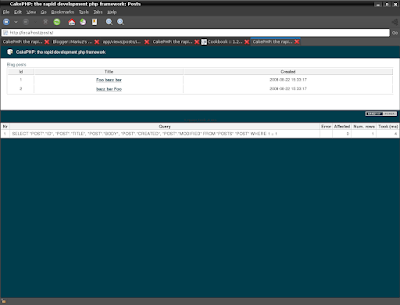
You might have noticed the use of an object called
When specifying URL's in Cake, you simply give a path relative to the base of the application, and Cake fills in the rest. As such, your URL's will typically take the form of
At this point, you should be able to point your browser to http://www.example.com/posts/index. You should see your view, correctly formatted with the title and table listing of the posts.
If you happened to have clicked on one of the links we created in this view (that link a post's title to a URL

If you were not so informed, either something has gone wrong, or you actually did define it already, in which case you are very sneaky. Otherwise, we'll create it in the PostsController now:
The set() call should look familiar. Notice we're using read() rather than find('all') because we only really want a single post's information.
Notice that our view action takes a parameter: the ID of the post we'd like to see. This parameter is handed to the action through the requested URL. If a user requests /posts/view/3, then the value '3' is passed as $id.
Now let's create the view for our new 'view' action and place it in /app/views/posts/view.ctp.
Verify that this is working by trying the links at /posts/index or manually requesting a post by accessing /posts/view/1.
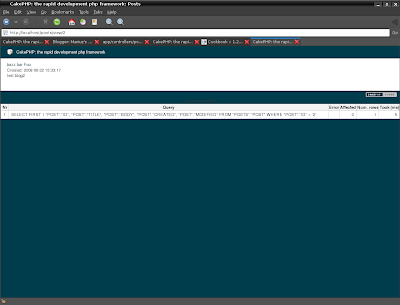
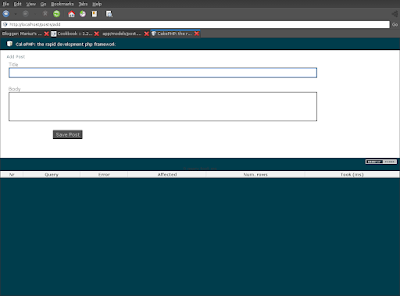
Reading from the database and showing us the posts is a great start, but lets allow for the adding of new posts.
First, start by creating an
Here's what the
When a user uses a form to POST data to your application, that information is available in
The
Cake goes a long way in taking the monotony out of form input validation. Everyone hates coding up endless forms and their validation routines. CakePHP makes it easier and faster.
To take advantage of the validation features, you'll need to use Cake's FormHelper in your views. The FormHelper is available by default to all views at
Here's our add view:
Here, we use the FormHelper to generate the opening tag for an HTML form. Here's the HTML that
The
The
Now let's go back and update our
, add the following line:
http://github.com/mariuz/firetube/commit/136a4015517c45db34b89b4376520d759f0df759
You may be wondering: how do I tell CakePHP about my validation requirements? Validation rules are defined in the model. Let's look back at our Post model and make a few adjustments:
$ vim app/models/post.php
The
Now that you have your validation rules in place, use the app to try to add a post with an empty title or body to see how it works. Since we've used the input() method of the FormHelper to create our form elements, our validation error messages will be shown automatically.
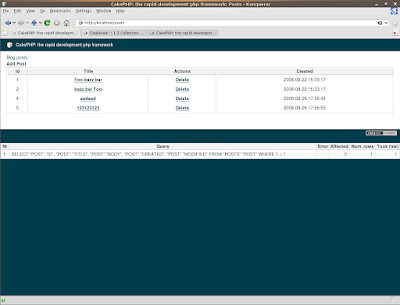
This logic deletes the post specified by $id, and uses
Because we're just executing some logic and redirecting, this action has no view. You might want to update your index view with links that allow users to delete posts, however:

work with original tutorial
so we will follow it from 10.1.6 to the end 10.1.14
Create a Post Model
The Model class is the bread and butter of CakePHP applications. By creating a CakePHP model that will interact with our database, we'll have the foundation in place needed to do our view, add, edit, and delete operations later.
CakePHP's model class files go in
/app/models, and the file we'll be creating will be saved to /app/models/post.php. The completed file should look like this:Naming convention is very important in CakePHP. By naming our model Post, CakePHP can automatically infer that this model will be used in the PostsController, and will be tied to a database table called
posts.For more on models, such as table prefixes, callbacks, and validation, check out the Models chapter of the Manual.
Create a Posts Controller
Next, we'll create a controller for our posts. The controller is where all the business logic for post interaction will happen. In a nutshell, it's the place where you play with the models and get post-related work done. We'll place this new controller in a file called
posts_controller.php inside the /app/controllers directory. Here's what the basic controller should look like:vim app/controllers/posts_controller.php
If you test now the /posts controller you will see that no action is defined for index
http://localhost/posts/

Now, lets add an action to our controller. Actions often represent a single function or interface in an application. For example, when users request www.example.com/posts/index (which is also the same as www.example.com/posts/), they might expect to see a listing of posts. The code for that action would look something like this:
Let me explain the action a bit. By defining function index() in our PostsController, users can now access the logic there by requesting www.example.com/posts/index. Similarly, if we were to define a function called foobar(), users would be able to access that at www.example.com/posts/foobar.
The single instruction in the action uses
set() to pass data from the controller to the view (which we'll create next). The line sets the view variable called 'posts' equal to the return value of the find('all') method of the Post model. Our Post model is automatically available at $this->Post because we've followed Cake's naming conventions.To learn more about Cake's controllers, check out Chapter "Developing with CakePHP" section: "Controllers".
If you try to load it you will see the missing view error
http://localhost/posts/

So we have to create the view
Now that we have our data flowing to our model, and our application logic and flow defined by our controller, let's create a view for the index action we created above.
Cake views are just presentation-flavored fragments that fit inside an application's layout. For most applications they're HTML mixed with PHP, but they may end up as XML, CSV, or even binary data.
Layouts are presentation code that is wrapped around a view, and can be defined and switched between, but for now, let's just use the default.
Remember in the last section how we assigned the 'posts' variable to the view using the
set() method? That would hand down data to the view that would look something like this:$ mkdir app/views/posts
$ vim app/views/posts/index.ctp
Array ( [0] => Array ( [Post] => Array ( [id] => 1 [title] => Foo bazz bar [body] => test blog [created] => 2008-08-22 15:33:17 [modified] => 2008-08-22 15:33:17 ) ) [1] => Array ( [Post] => Array ( [id] => 2 [title] => bazz bar Foo [body] => test blog2 [created] => 2008-08-22 15:33:17 [modified] => 2008-08-22 15:33:17 ) ) )

Cake's view files are stored in /app/views inside a folder named after the controller they correspond to (we'll have to create a folder named 'posts' in this case). To format this post data in a nice table, our view code might look something like this:
Hopefully this should look somewhat simple.

You might have noticed the use of an object called
$html. This is an instance of the CakePHP HtmlHelper class. CakePHP comes with a set of view helpers that make things like linking, form output, JavaScript and Ajax a snap. You can learn more about how to use them in Chapter "Built-in Helpers", but what's important to note here is that the link() method will generate an HTML link with the given title (the first parameter) and URL (the second parameter).When specifying URL's in Cake, you simply give a path relative to the base of the application, and Cake fills in the rest. As such, your URL's will typically take the form of
/controller/action/param1/param2.At this point, you should be able to point your browser to http://www.example.com/posts/index. You should see your view, correctly formatted with the title and table listing of the posts.
If you happened to have clicked on one of the links we created in this view (that link a post's title to a URL
/posts/view/some_id), you were probably informed by CakePHP that the action hasn't yet been defined.
If you were not so informed, either something has gone wrong, or you actually did define it already, in which case you are very sneaky. Otherwise, we'll create it in the PostsController now:
The set() call should look familiar. Notice we're using read() rather than find('all') because we only really want a single post's information.
Notice that our view action takes a parameter: the ID of the post we'd like to see. This parameter is handed to the action through the requested URL. If a user requests /posts/view/3, then the value '3' is passed as $id.
Now let's create the view for our new 'view' action and place it in /app/views/posts/view.ctp.
Verify that this is working by trying the links at /posts/index or manually requesting a post by accessing /posts/view/1.

Adding Posts
Reading from the database and showing us the posts is a great start, but lets allow for the adding of new posts.
First, start by creating an
add() action in the PostsController:Here's what the
add() action does: if the submitted form data isn't empty, try to save the data using the Post model. If for some reason it doesn't save, just render the view. This gives us a chance to show the user validation errors or other warnings.When a user uses a form to POST data to your application, that information is available in
$this->data. You can use the pr() to print it out if you want to see what it looks like.The
$this->flash() function called is a controller method that flashes a message to the user for a second (using the flash layout) then forwards the user on to another URL (/posts, in this case).
If DEBUG is set to 0,
Calling the $this->flash() will redirect automatically. If DEBUG is greater than 0 (DEBUG is 2 by default) flash messages do not redirect.save() method will check for validation errors and abort the save if any occur. We'll discuss how those errors are handled in the following sections.Data Validation
Cake goes a long way in taking the monotony out of form input validation. Everyone hates coding up endless forms and their validation routines. CakePHP makes it easier and faster.
To take advantage of the validation features, you'll need to use Cake's FormHelper in your views. The FormHelper is available by default to all views at
$form.Here's our add view:
vim app/views/posts/add.ctpHere, we use the FormHelper to generate the opening tag for an HTML form. Here's the HTML that
$form->create() generates:< id="PostAddForm" method="post" action="/posts/add">If
create() is called with no parameters supplied, it assumes you are building a form that submits to the current controller's add() action, via POST.The
$form->input() method is used to create form elements of the same name. The first parameter tells CakePHP which field they correspond to, and the second parameter allows you to specify a wide array of options — in this case, the number of rows for the textarea. There's a bit of introspection and automagic here: input() will output different form elements based on the model field specified.The
$form->end() call generates a submit button and ends the form. If a string is supplied as the first parameter to end(), the FormHelper outputs a submit button named accordingly along with the closing form tag. Again, refer to Chapter "Built-in Helpers" for more on helpers.Now let's go back and update our
/app/views/posts/index.ctp view to include a new "Add Post" link. Before the , add the following line:
http://github.com/mariuz/firetube/commit/136a4015517c45db34b89b4376520d759f0df759
You may be wondering: how do I tell CakePHP about my validation requirements? Validation rules are defined in the model. Let's look back at our Post model and make a few adjustments:
$ vim app/models/post.php
The
$validate array tells CakePHP how to validate your data when the save() method is called. Here, I've specified that both the body and title fields must not be empty. CakePHP's validation engine is strong, with a number of pre-built rules (credit card numbers, email addresses, etc.) and flexibility for custom validation rules. For more information on that setup, check the Data Validation chapter.Now that you have your validation rules in place, use the app to try to add a post with an empty title or body to see how it works. Since we've used the input() method of the FormHelper to create our form elements, our validation error messages will be shown automatically.

Deleting Posts
Next, let's make a way for users to delete posts. Start with adelete() action in the PostsController:function delete($id) {
$this->Post->del($id);
$this->flash('The post with id: '.$id.' has been deleted.', '/posts');
}
This logic deletes the post specified by $id, and uses
flash() to show the user a confirmation message before redirecting them on to /posts.Because we're just executing some logic and redirecting, this action has no view. You might want to update your index view with links that allow users to delete posts, however:


Monday, August 25, 2008
previous ffmpeg install script is now rewritten in php
for the moment is tested on ubuntu hardy
also it is split so there are mini scripts for flvtool2 and mencoder/mplayer
for the moment is tested on ubuntu hardy
also it is split so there are mini scripts for flvtool2 and mencoder/mplayer
when i failed to push some refs to 'git@github.com:mariuz/firebird_scripts.git'
git push origin master
To git@github.com:mariuz/firebird_scripts.git
! [rejected] master -> master (non-fast forward)
error: failed to push some refs to 'git@github.com:mariuz/firebird_scripts.git'
so seems that i need to pull first and then push it again (Some readme was modfied elsewhere)
git pull git@github.com:mariuz/firebird_scripts.git master
From git@github.com:mariuz/firebird_scripts
* branch master -> FETCH_HEAD
Merge made by recursive.
README | 10 ++++++----
1 files changed, 6 insertions(+), 4 deletions(-)
git push origin master
Counting objects: 7, done.
Compressing objects: 100% (5/5), done.
Writing objects: 100% (5/5), 1.10 KiB, done.
Total 5 (delta 2), reused 0 (delta 0)
To git@github.com:mariuz/firebird_scripts.git
2ff4ccf..11d752a master -> master
git push origin master
To git@github.com:mariuz/firebird_scripts.git
! [rejected] master -> master (non-fast forward)
error: failed to push some refs to 'git@github.com:mariuz/firebird_scripts.git'
so seems that i need to pull first and then push it again (Some readme was modfied elsewhere)
git pull git@github.com:mariuz/firebird_scripts.git master
From git@github.com:mariuz/firebird_scripts
* branch master -> FETCH_HEAD
Merge made by recursive.
README | 10 ++++++----
1 files changed, 6 insertions(+), 4 deletions(-)
git push origin master
Counting objects: 7, done.
Compressing objects: 100% (5/5), done.
Writing objects: 100% (5/5), 1.10 KiB, done.
Total 5 (delta 2), reused 0 (delta 0)
To git@github.com:mariuz/firebird_scripts.git
2ff4ccf..11d752a master -> master

testing firefox nightly - crashy foxy 3.1
on my ubuntu intrepid ibex 64 i wanted to test the new jit things
http://ejohn.org/blog/tracemonkey/
wget http://ftp.mozilla.org/pub/mozilla.org/firefox/nightly/latest-trunk/firefox-3.1a2pre.en-US.linux-x86_64.tar.bz2
cd firefox/
./firefox
enable the jit
javascript.options.jit.content true
then do some tests
http://people.mozilla.com/~schrep/image12.html

epiphany-webkit in intrepid ibex
sudo apt-get install epiphany-webkit
is still buggy , seems to crash when i try to post in blogger.com and have issues with flash plugin
epiphany-webkit ^CSegmentation fault (core dumped) mariuz@borkstationx64:~/work/midori$ epiphany-webkit The program 'npviewer.bin' received an X Window System error. This probably reflects a bug in the program. The error was 'BadWindow (invalid Window parameter)'. (Details: serial 10 error_code 3 request_code 3 minor_code 0) (Note to programmers: normally, X errors are reported asynchronously; that is, you will receive the error a while after causing it. To debug your program, run it with the --sync command line option to change this behavior. You can then get a meaningful backtrace from your debugger if you break on the gdk_x_error() function.)
but is good that is here , i use epiphany with gecko a lot and an good alternative
is wellcome

sudo apt-get install epiphany-webkit
is still buggy , seems to crash when i try to post in blogger.com and have issues with flash plugin
epiphany-webkit ^CSegmentation fault (core dumped) mariuz@borkstationx64:~/work/midori$ epiphany-webkit The program 'npviewer.bin' received an X Window System error. This probably reflects a bug in the program. The error was 'BadWindow (invalid Window parameter)'. (Details: serial 10 error_code 3 request_code 3 minor_code 0) (Note to programmers: normally, X errors are reported asynchronously; that is, you will receive the error a while after causing it. To debug your program, run it with the --sync command line option to change this behavior. You can then get a meaningful backtrace from your debugger if you break on the gdk_x_error() function.)
but is good that is here , i use epiphany with gecko a lot and an good alternative
is wellcome

git pull with master branch
I wanted to sync with my master branch from main repository
I have added some files in the weekend , and got this message from git
cd /opt/nginx/html/firetube
$ git pull
You asked me to pull without telling me which branch you
want to merge with, and 'branch.master.merge' in
your configuration file does not tell me either. Please
name which branch you want to merge on the command line and
try again (e.g. 'git pull ').
See git-pull(1) for details on the refspec.
If you often merge with the same branch, you may want to
configure the following variables in your configuration
file:
branch.master.remote =
branch.master.merge =
remote..url =
remote..fetch =
See git-config(1) for details.
$ git pull git@github.com:mariuz/firetube.git master
From git@github.com:mariuz/firetube
* branch master -> FETCH_HEAD
Updating 1e85082..7a3c469
Fast forward
app/config/sql/firetube.sql | 51 ++++++++++++++++++++++++++++++++++
app/controllers/posts_controller.php | 14 +++++++--
app/models/post.php | 13 +++++++-
app/views/posts/add.ctp | 7 ++++
app/views/posts/index.ctp | 1 +
5 files changed, 81 insertions(+), 5 deletions(-)
create mode 100644 app/config/sql/firetube.sql
create mode 100644 app/views/posts/add.ctp
I wanted to sync with my master branch from main repository
I have added some files in the weekend , and got this message from git
cd /opt/nginx/html/firetube
$ git pull
You asked me to pull without telling me which branch you
want to merge with, and 'branch.master.merge' in
your configuration file does not tell me either. Please
name which branch you want to merge on the command line and
try again (e.g. 'git pull
See git-pull(1) for details on the refspec.
If you often merge with the same branch, you may want to
configure the following variables in your configuration
file:
branch.master.remote =
branch.master.merge =
remote.
remote.
See git-config(1) for details.
$ git pull git@github.com:mariuz/firetube.git master
From git@github.com:mariuz/firetube
* branch master -> FETCH_HEAD
Updating 1e85082..7a3c469
Fast forward
app/config/sql/firetube.sql | 51 ++++++++++++++++++++++++++++++++++
app/controllers/posts_controller.php | 14 +++++++--
app/models/post.php | 13 +++++++-
app/views/posts/add.ctp | 7 ++++
app/views/posts/index.ctp | 1 +
5 files changed, 81 insertions(+), 5 deletions(-)
create mode 100644 app/config/sql/firetube.sql
create mode 100644 app/views/posts/add.ctp
Friday, August 22, 2008
when you push to the wrong url
I git pushed to the wrong url
git clone git://github.com/mariuz/firebird_scripts.git
modified README
and then
git commit -a
Created commit 7365a4d: Modified the README
1 files changed, 2 insertions(+), 2 deletions(-)
mariuz@borkstation64:~/work/firebird_scripts$ git push origin master
fatal: protocol error: expected sha/ref, got '
*********'
You can't push to git://github.com/user/repo.git
Use git@github.com:user/repo.git
*********'
rm -rf firebird_scripts
instead it should work with this url so i can push
git clone git@github.com:mariuz/firebird_scripts.git
Initialized empty Git repository in /home/mariuz/work/firebird_scripts/.git/
The authenticity of host 'github.com (65.74.177.129)' can't be established.
RSA key fingerprint is 16:27:ac:a5:76:28:2d:36:63:1b:56:4d:eb:df:a6:48.
Are you sure you want to continue connecting (yes/no)? yes
Warning: Permanently added 'github.com,65.74.177.129' (RSA) to the list of known hosts.
remote: Counting objects: 116, done.
remote: Compressing objects: 100% (54/54), done.
remote: Total 116 (delta 56), reused 116 (delta 56)
Receiving objects: 100% (116/116), 11.51 KiB, done.
Resolving deltas: 100% (56/56), done.
I git pushed to the wrong url
git clone git://github.com/mariuz/firebird_scripts.git
modified README
and then
git commit -a
Created commit 7365a4d: Modified the README
1 files changed, 2 insertions(+), 2 deletions(-)
mariuz@borkstation64:~/work/firebird_scripts$ git push origin master
fatal: protocol error: expected sha/ref, got '
*********'
You can't push to git://github.com/user/repo.git
Use git@github.com:user/repo.git
*********'
rm -rf firebird_scripts
instead it should work with this url so i can push
git clone git@github.com:mariuz/firebird_scripts.git
Initialized empty Git repository in /home/mariuz/work/firebird_scripts/.git/
The authenticity of host 'github.com (65.74.177.129)' can't be established.
RSA key fingerprint is 16:27:ac:a5:76:28:2d:36:63:1b:56:4d:eb:df:a6:48.
Are you sure you want to continue connecting (yes/no)? yes
Warning: Permanently added 'github.com,65.74.177.129' (RSA) to the list of known hosts.
remote: Counting objects: 116, done.
remote: Compressing objects: 100% (54/54), done.
remote: Total 116 (delta 56), reused 116 (delta 56)
Receiving objects: 100% (116/116), 11.51 KiB, done.
Resolving deltas: 100% (56/56), done.
Cakephp 1.2.x tutorial for Ubuntu Firebird and Nginx
You're probably checking out this tutorial because you want to use firebird with cakephp.
We will create acreation of a simple blog application. We'll be getting and installing Cake, creating and configuring a database, and creating enough application logic to list, add, edit, and delete blog posts.
Here's what you'll need:
Follow this guide to install firebird and php5-interbase
https://help.ubuntu.com/community/Firebird2.5
add firebird repository
sudo pico /etc/apt/sources.list.d/firebird.list
and add
deb http://ppa.launchpad.net/mapopa/ubuntu natty main
deb-src http://ppa.launchpad.net/mapopa/ubuntu natty main
For installing firebird you can run this script from the firebird-scripts
it will do all the above steps
$sudo php firebird-install.php
and optionally flamerobin if you are on desktop side
$sudo apt-get install flamerobin
First, let's get a copy of fresh Cake code.
To get a fresh download, visit the CakePHP project at github:
https://github.com/cakephp/cakephp/tags
and download the stable release. For this tutorial you need 1.2.x.x
$ wget https://github.com/cakephp/cakephp/tarball/1.2.11 -O cakephp-1.2.11.tar.gz
$tar -zxvf cakephp-1.2.11.tar.gz
$ chown -R www-data.www-data cakephp-cakephp-*
$ sudo mv cakephp-cakephp-* /opt/nginx/html/firetube
or run this script from the firebird-scripts
$sudo php cake-install.php
Regardless of how you downloaded it, place the code inside of your DocumentRoot. Once finished, your directory setup should look something like the following:
Now might be a good time to learn a bit about how Cake's directory
structure works: check out Chapter "Basic Principles of CakePHP", Section :
CakePHP File Structure.
load localhost and you should see something like this

I have created the database with flamerobin
Database -> Create new database
Display name:firetube
Database:path:/var/lib/firebird/2.5/data/firetube.fdb
Username:sysdba
password:masterkey
/****************** GENERATORS ********************/
CREATE GENERATOR GEN_POSTS_ID;
/******************** TABLES **********************/
CREATE TABLE POSTS
(
ID Integer NOT NULL,
TITLE Varchar(50),
BODY Varchar(2000),
CREATED Timestamp,
MODIFIED Timestamp,
PRIMARY KEY (ID)
);
/******************** TRIGGERS ********************/
SET TERM ^ ;
CREATE TRIGGER POSTS_BI FOR POSTS ACTIVE
BEFORE INSERT POSITION 0
AS
BEGIN
IF (NEW.ID IS NULL) THEN
NEW.ID = GEN_ID(GEN_POSTS_ID, 1);
END^
SET TERM ; ^
GRANT DELETE, INSERT, REFERENCES, SELECT, UPDATE
ON POSTS TO SYSDBA WITH GRANT OPTION;
INSERT INTO "POSTS" ("TITLE","BODY","MODIFIED","CREATED") VALUES ('Foo bazz bar','test blog ','now','now');
INSERT INTO "POSTS" ("TITLE","BODY","MODIFIED","CREATED") VALUES (' bazz bar Foo','test blog2 ','now','now');

The choices on table and column names are not arbitrary. If you follow Cake's database naming conventions, and Cake's class naming conventions (both outlined in "CakePHP Conventions"), you'll be able to take advantage of a lot of free functionality and avoid configuration. Cake is flexible enough to accomodate even the worst legacy database schema, but adhering to convention will save you time.
Check out "CakePHP Conventions" for more information, but suffice it to say that naming our table 'posts' automatically hooks it to our Post model, and having fields called 'modified' and 'created' will be automagically managed by Cake.
A copy of CakePHP's database configuration file is found in
The config file should be pretty straightforward: just replace the values in the $default array with those that apply to your setup. A sample completed configuration array might look something like the following:
var $default = array(
'driver' => 'firebird',
'persistent' => false,
'host' => 'localhost',
'port' => '',
'login' => 'sysdba',
'password' => 'masterkey',
'database' => '/var/lib/firebird/2.5/data/firetube.fdb',
'schema' => '',
'prefix' => '',
'encoding' => ''
);
Once you've saved your new

There are two other items that can be configured. Most developers complete these laundry-list items, but they're not required for this tutorial. One is defining a custom string (or "salt") for use in security hashes. The second item is allowing CakePHP write access to its
The security salt is used for generating hashes. Change the default salt value by editing
So all it should be all green in configuration check

Occasionally a new user will run in to rewrite issues, so I'll mention them marginally here. If the CakePHP welcome page looks a little funny (no images or css styles), it probably means rewrite isn't functioning on your system. Here are some tips to help get you up and running on nginx
location / {
root html/firetube/app/webroot;
index index.php;
# If the file exists as a static file serve it
# directly without running all
# the other rewite tests on it
if (-f $request_filename) {
break;
}
if (!-f $request_filename) {
rewrite ^/(.+)$ /index.php?url=$1 last;
break;
}
}
You can follow now the part 2 from this tutorial
We will create acreation of a simple blog application. We'll be getting and installing Cake, creating and configuring a database, and creating enough application logic to list, add, edit, and delete blog posts.
Here's what you'll need:
- A running web server. We're going to assume you're using Nginx , that is the recommended for performance and for it's simple elegance
- A database server. We're going to be using Firebird in this tutorial. You'll need to know enough about SQL in order to create a database but is good if you know the Relational way.
- Basic PHP knowledge. The more object-oriented programming you've done, the better
- Finally, you'll need a basic knowledge of the MVC programming pattern. A quick overview can be found in Chapter "Beginning With CakePHP", Section : Understanding Model-View-Controller.
$ sudo apt-get install git-core php5-cli
$ git clone  git://github.com/mariuz/firebird_scripts.git
$ cd firebird_scripts
$ sudo php nginx-build.php
Follow this guide to install firebird and php5-interbase
https://help.ubuntu.com/community/Firebird2.5
add firebird repository
sudo pico /etc/apt/sources.list.d/firebird.list
and add
deb http://ppa.launchpad.net/mapopa/ubuntu natty main
deb-src http://ppa.launchpad.net/mapopa/ubuntu natty main
$apt-get update
$sudo apt-get -y --force-yes install firebird2.5-super php5-interbase
$sudo dpkg-reconfigure firebird2.5-super
For installing firebird you can run this script from the firebird-scripts
it will do all the above steps
$sudo php firebird-install.php
and optionally flamerobin if you are on desktop side
$sudo apt-get install flamerobin
Getting Cake
First, let's get a copy of fresh Cake code.
To get a fresh download, visit the CakePHP project at github:
https://github.com/cakephp/cakephp/tags
and download the stable release. For this tutorial you need 1.2.x.x
$ wget https://github.com/cakephp/cakephp/tarball/1.2.11 -O cakephp-1.2.11.tar.gz
$tar -zxvf cakephp-1.2.11.tar.gz
$ chown -R www-data.www-data cakephp-cakephp-*
$ sudo mv cakephp-cakephp-* /opt/nginx/html/firetube
or run this script from the firebird-scripts
$sudo php cake-install.php
Regardless of how you downloaded it, place the code inside of your DocumentRoot. Once finished, your directory setup should look something like the following:
/opt/nginx/html/firetube
/app
/cake
/docs
/vendors
.htaccess
index.php
Now might be a good time to learn a bit about how Cake's directory
structure works: check out Chapter "Basic Principles of CakePHP", Section :
CakePHP File Structure.
load localhost and you should see something like this

Creating the Blog Database
Next, lets set up the underlying database for our blog. Right now, we'll just create a single table to store our posts. We'll also throw in a few posts right now to use for testing purposes. Execute the following SQL statements into your databaseI have created the database with flamerobin
Database -> Create new database
Display name:firetube
Database:path:/var/lib/firebird/2.5/data/firetube.fdb
Username:sysdba
password:masterkey
/****************** GENERATORS ********************/
CREATE GENERATOR GEN_POSTS_ID;
/******************** TABLES **********************/
CREATE TABLE POSTS
(
ID Integer NOT NULL,
TITLE Varchar(50),
BODY Varchar(2000),
CREATED Timestamp,
MODIFIED Timestamp,
PRIMARY KEY (ID)
);
/******************** TRIGGERS ********************/
SET TERM ^ ;
CREATE TRIGGER POSTS_BI FOR POSTS ACTIVE
BEFORE INSERT POSITION 0
AS
BEGIN
IF (NEW.ID IS NULL) THEN
NEW.ID = GEN_ID(GEN_POSTS_ID, 1);
END^
SET TERM ; ^
GRANT DELETE, INSERT, REFERENCES, SELECT, UPDATE
ON POSTS TO SYSDBA WITH GRANT OPTION;
INSERT INTO "POSTS" ("TITLE","BODY","MODIFIED","CREATED") VALUES ('Foo bazz bar','test blog ','now','now');
INSERT INTO "POSTS" ("TITLE","BODY","MODIFIED","CREATED") VALUES (' bazz bar Foo','test blog2 ','now','now');

The choices on table and column names are not arbitrary. If you follow Cake's database naming conventions, and Cake's class naming conventions (both outlined in "CakePHP Conventions"), you'll be able to take advantage of a lot of free functionality and avoid configuration. Cake is flexible enough to accomodate even the worst legacy database schema, but adhering to convention will save you time.
Check out "CakePHP Conventions" for more information, but suffice it to say that naming our table 'posts' automatically hooks it to our Post model, and having fields called 'modified' and 'created' will be automagically managed by Cake.
Cake Database Configuration
A copy of CakePHP's database configuration file is found in
/app/config/database.php.default. Make a copy of this file in the same directory, but name it database.php.The config file should be pretty straightforward: just replace the values in the $default array with those that apply to your setup. A sample completed configuration array might look something like the following:
var $default = array(
'driver' => 'firebird',
'persistent' => false,
'host' => 'localhost',
'port' => '',
'login' => 'sysdba',
'password' => 'masterkey',
'database' => '/var/lib/firebird/2.5/data/firetube.fdb',
'schema' => '',
'prefix' => '',
'encoding' => ''
);
Once you've saved your new
database.php file, you should be able to open your browser and see the Cake welcome page. It should also tell you that your database connection file was found, and that Cake can successfully connect to the database.
Optional Configuration
There are two other items that can be configured. Most developers complete these laundry-list items, but they're not required for this tutorial. One is defining a custom string (or "salt") for use in security hashes. The second item is allowing CakePHP write access to its
tmp folder.The security salt is used for generating hashes. Change the default salt value by editing
/app/config/core.php line 153. It doesn't much matter what the new value is, as long as its not easily guessed./**
* A random string used in security hashing methods.
*/
Configure::write('Security.salt', 'pl345e-P45s_7h3*S@l7!');
The final task is to make the app/tmp directory web-writable. The best way to do this is to find out what user your webserver runs as (app/tmp directory to that user. The final command you run (in *nix) might look something like this.$ chown -R www-data app/tmpIf for some reason CakePHP can't write to that directory, you'll be informed by a warning while not in production mode.
So all it should be all green in configuration check

Note on rewrite on nginx
Occasionally a new user will run in to rewrite issues, so I'll mention them marginally here. If the CakePHP welcome page looks a little funny (no images or css styles), it probably means rewrite isn't functioning on your system. Here are some tips to help get you up and running on nginx
location / {
root html/firetube/app/webroot;
index index.php;
# If the file exists as a static file serve it
# directly without running all
# the other rewite tests on it
if (-f $request_filename) {
break;
}
if (!-f $request_filename) {
rewrite ^/(.+)$ /index.php?url=$1 last;
break;
}
}
You can follow now the part 2 from this tutorial
debian live image - create and customize it
This thread will cover how I use live-helper to create a base image, add software to the base image, and customize it.
seems that ubuntu cd is too bloated so i have to start with basic debian cd
This thread will cover how I use live-helper to create a base image, add software to the base image, and customize it.
seems that ubuntu cd is too bloated so i have to start with basic debian cd
Thursday, August 21, 2008
Creating a Flamerobin/Firebird livecd with Ubuntu Hardy
this is an howto create your own ubuntu live cd with firebird/ubuntu and custom applications ,in guide ubuntu variation used was Xubuntu (is smaller and can be customized easier ) but it works for any hardy release
read more | digg story
read more | digg story
adding locale in debian and php
sudo apt-get install language-pack-ro-base or
sudo apt-get install language-pack-fr-base
sudo dpkg-reconfigure locales
locale -a
C
de_AT.utf8
de_BE.utf8
de_CH.utf8
de_DE.utf8
de_LU.utf8
en_US.utf8
fr_BE.utf8
fr_CA.utf8
fr_CH.utf8
fr_FR.utf8
fr_LU.utf8
POSIX
ro_RO.utf8
write an php test script locales.php
setlocale(LC_TIME, 'ro_RO.UTF8'); // note the charset info !
echo strftime("%B");
php locales.php
august
sudo apt-get install language-pack-ro-base or
sudo apt-get install language-pack-fr-base
sudo dpkg-reconfigure locales
locale -a
C
de_AT.utf8
de_BE.utf8
de_CH.utf8
de_DE.utf8
de_LU.utf8
en_US.utf8
fr_BE.utf8
fr_CA.utf8
fr_CH.utf8
fr_FR.utf8
fr_LU.utf8
POSIX
ro_RO.utf8
write an php test script locales.php
setlocale(LC_TIME, 'ro_RO.UTF8'); // note the charset info !
echo strftime("%B");
php locales.php
august
Transforming your Installation into a Live DVD/CD
This HOWTO is about making a live CD/DVD from the main system on your hard drive. This might be desired if you have customized your system and want to have it on CD.
This HOWTO is about making a live CD/DVD from the main system on your hard drive. This might be desired if you have customized your system and want to have it on CD.
Wednesday, August 20, 2008
Nginix + php howto
#1. install the needed packages
$apt-get install php5-cli php5-cgi build-essential
#2. install nginix from source
$mkdir -p /opt/build/nginx
$cd /opt/build/nginx
$wget --continue http://sysoev.ru/nginx/nginx-0.7.32.tar.gz
$tar -zxvf nginx-0.6.32.tar.gz
$cd nginx-0.6.32
$./configure --prefix=/opt/nginx --with-http_flv_module
$make
$sudo make install
#3.install fast cgi support for php http://www.howtoforge.com/nginx_php5_fast_cgi_xcache_ubuntu7.04
wget http://www.lighttpd.net/download/lighttpd-1.4.19.tar.gz
tar -zxvf lighttpd-1.4.19.tar.gz
cd lighttpd-1.4.19
./configure ; make
cp src/spawn-fcgi /usr/bin/spawn-fcgi
sudo vi /usr/bin/php-fastcgi
#!/bin/sh
/usr/bin/spawn-fcgi -a 127.0.0.1 -p 9000 -u www-data -f /usr/bin/php5-cgi
sudo chmod +x /usr/bin/php-fastcgi
update-rc.d init-fastcgi defaults
/etc/init.d/init-fastcgi start
in nginx conf uncomment add these lines
location ~ \.php$ {
root /var/www;
fastcgi_pass 127.0.0.1:9000;
fastcgi_index index.php;
fastcgi_param SCRIPT_FILENAME /var/www/$fastcgi_script_name;
include fastcgi_params;
}
and you should start the nginix server
$/opt/nginx/sbin/nginx
load the http://localhost
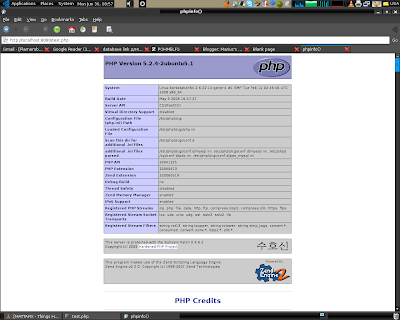
You can add an init script for it this way
#1. install the needed packages
$apt-get install php5-cli php5-cgi build-essential
libpcre3 libpcre3-dev libpcrecpp0 libssl-dev zlib1g-dev#2. install nginix from source
$mkdir -p /opt/build/nginx
$cd /opt/build/nginx
$wget --continue http://sysoev.ru/nginx/nginx-0.7.32.tar.gz
$tar -zxvf nginx-0.6.32.tar.gz
$cd nginx-0.6.32
$./configure --prefix=/opt/nginx --with-http_flv_module
$make
$sudo make install
#3.install fast cgi support for php http://www.howtoforge.com/nginx_php5_fast_cgi_xcache_ubuntu7.04
wget http://www.lighttpd.net/download/lighttpd-1.4.19.tar.gz
tar -zxvf lighttpd-1.4.19.tar.gz
cd lighttpd-1.4.19
./configure ; make
cp src/spawn-fcgi /usr/bin/spawn-fcgi
sudo vi /usr/bin/php-fastcgi
#!/bin/sh
/usr/bin/spawn-fcgi -a 127.0.0.1 -p 9000 -u www-data -f /usr/bin/php5-cgi
sudo chmod +x /usr/bin/php-fastcgi
update-rc.d init-fastcgi defaults
/etc/init.d/init-fastcgi start
in nginx conf uncomment add these lines
location ~ \.php$ {
root /var/www;
fastcgi_pass 127.0.0.1:9000;
fastcgi_index index.php;
fastcgi_param SCRIPT_FILENAME /var/www/$fastcgi_script_name;
include fastcgi_params;
}
and you should start the nginix server
$/opt/nginx/sbin/nginx
load the http://localhost

You can add an init script for it this way
Tuesday, August 19, 2008
Why git ? , and start replacing your svn repository
Start using git-svn and mirror the svn repository with all it's history
then if you feel safe you can work directly on it and push to svn when an release is needed
http://google-opensource.blogspot.com/2008/05/develop-with-git-on-google-code-project.html
http://cheat.errtheblog.com/s/gitsvn/
http://andy.delcambre.com/2008/3/4/git-svn-workflow
Many projects are using git as their main DVCS
ROR, QT,Linux Kernel, Samba , Free Desktop , VLC, Google Android
http://git.or.cz/gitwiki/GitProjects
http://www.youtube.com/watch?v=4XpnKHJAok8
Also there is an windows version , I have tested the msysGit
Git on MSYS is already used in production environments. It comes in an installer package, supports Git command-line usage (both Git-Bash and Windows Command-line) and Git-GUI/Gitk and also has basic Explorer integration
http://ie.brokethe.net/2008/3/19/git-on-windows
For Eclipse there is an git plugin , but we have to test it (i used git only from the commandline )
http://git.or.cz/gitwiki/EclipsePlugin
http://cho.hapgoods.com/wordpress/?p=159
ps: here is an git book for learning
http://cworth.org/hgbook-git/tour/
Start using git-svn and mirror the svn repository with all it's history
then if you feel safe you can work directly on it and push to svn when an release is needed
http://google-opensource.blogspot.com/2008/05/develop-with-git-on-google-code-project.html
http://cheat.errtheblog.com/s/gitsvn/
http://andy.delcambre.com/2008/3/4/git-svn-workflow
Many projects are using git as their main DVCS
ROR, QT,Linux Kernel, Samba , Free Desktop , VLC, Google Android
http://git.or.cz/gitwiki/GitProjects
http://www.youtube.com/watch?v=4XpnKHJAok8
Also there is an windows version , I have tested the msysGit
Git on MSYS is already used in production environments. It comes in an installer package, supports Git command-line usage (both Git-Bash and Windows Command-line) and Git-GUI/Gitk and also has basic Explorer integration
http://ie.brokethe.net/2008/3/19/git-on-windows
For Eclipse there is an git plugin , but we have to test it (i used git only from the commandline )
http://git.or.cz/gitwiki/EclipsePlugin
http://cho.hapgoods.com/wordpress/?p=159
ps: here is an git book for learning
http://cworth.org/hgbook-git/tour/
Firebird 2.5 build script is in git now
You might need git for this script and php
$ sudo apt-get install git-core php5-cli
$ git clone git://github.com/mariuz/firebird_scripts.git
$ cd firebird_scripts
$ php firebird-build.php
You might need git for this script and php
$ sudo apt-get install git-core php5-cli
$ git clone git://github.com/mariuz/firebird_scripts.git
$ cd firebird_scripts
$ php firebird-build.php
Monday, August 18, 2008

xdebug it worked with vim at last , also i started to make it work with eclipse too
Here are some related tutorials
Vim and xdebug setup
http://2bits.com/articles/using-vim-and-xdebug-dbgp-for-debugging-drupal-or-any-php-application.html
eclipse and xdebug
http://dev.phpeclipse.com/wiki/XDebug_and_PHPEclipse
And check the 10 minutes guide to interactive php debugger in vim
Friday, August 15, 2008
Installing kvm for the conference
For the firebird conference i have installed jeos on an kvm based virtual machine
Here is the guide for installing kvm on ubuntu
I have installed kvm using this guide on an cpu that supports'it
Then I downloaded the ubuntu hardy version for JeOs
an generic install cd for virtual appliances
wget http://cdimage.ubuntu.com/jeos/releases/hardy/release/


ps: virtualbox failed to be installed on my intrepid box also i will try to install it at home
For the firebird conference i have installed jeos on an kvm based virtual machine
Here is the guide for installing kvm on ubuntu
I have installed kvm using this guide on an cpu that supports'it
Then I downloaded the ubuntu hardy version for JeOs
an generic install cd for virtual appliances
wget http://cdimage.ubuntu.com/jeos/releases/hardy/release/


ps: virtualbox failed to be installed on my intrepid box also i will try to install it at home


Thursday, August 14, 2008
clone the php5.x git tree
here is the unofficial git tree for php
$git clone git://chinstrap.eu/srv/git/php/php-src.git
Initialized empty Git repository in /home/mariuz/work/php/php-src/.git/
remote: Counting objects: 334690, done.
remote: Compressing objects: 100% (68002/68002), done.
Receiving objects: 75% (253188/334690), 76.21 MiB | 285 KiB/s
here is the unofficial git tree for php
$git clone git://chinstrap.eu/srv/git/php/php-src.git
Initialized empty Git repository in /home/mariuz/work/php/php-src/.git/
remote: Counting objects: 334690, done.
remote: Compressing objects: 100% (68002/68002), done.
Receiving objects: 75% (253188/334690), 76.21 MiB | 285 KiB/s
building from git debian way on hardy
git clone git://git.videolan.org/vlc/git.git
cp -r vlc-0.9.0-git20080726/debian vlc
this was from previous snapshot
added in control
libxxf86dga-dev
libxxf86vm-dev
in rules
--disable-live555
on intrepid i have modified in control
libdc1394-22-dev
also i have removed the line with libgrowl_udp_plugin
in vlc-nox.install
./bootstrap
cd debian
dch -i
debuild -i
git clone git://git.videolan.org/vlc/git.git
cp -r vlc-0.9.0-git20080726/debian vlc
this was from previous snapshot
added in control
libxxf86dga-dev
libxxf86vm-dev
in rules
--disable-live555
on intrepid i have modified in control
libdc1394-22-dev
also i have removed the line with libgrowl_udp_plugin
in vlc-nox.install
./bootstrap
cd debian
dch -i
debuild -i
Wednesday, August 13, 2008
This paper covers how DNS works: first at a high level, then by picking apart an individual packet exchange field by field. Next, we'll use this knowledge to see how weaknesses in common implementations can lead to cache poisoning.
By fully understanding the issues at play, the reader may be better equipped to mitigate the risks in his or her own environment.
By fully understanding the issues at play, the reader may be better equipped to mitigate the risks in his or her own environment.
Monday, August 11, 2008
Forced-Writes and Firebird database corruption
Since Firebird 2.1 forced-writes also work in linux. With that in mind I put together a comparison between the two modes.What are forced-writes and when to use them?I hope DBAs who like to live dangerously find this useful.
read more | digg story
read more | digg story
Subscribe to:
Posts (Atom)